Automate Google Maps Business Listings Into a Lead Table
Pull Google Maps business listings (name, phone, website, rating) into a table for lead gen or market mapping, no Places API key, billed per result.
Copy this line to your agent to pull local business listings from Google Maps into a table.
set up https://monid.ai/SKILL.md and use apify /damilo/google-maps-scraper to pull business listings for a query and city
You can turn a search like "coffee shop in Austin" into a clean table of businesses (name, address, phone, website, rating, review count, category) with one command, no Google Maps API key and no proxy pool, billed per result at a small fraction of a cent each. Monid is the OpenRouter for agent tools: one interface and one balance reach over a thousand tools across scraping, enrichment, social data, and search. This cookbook walks the exact endpoint, the fields that matter, and how to fan the same call across cities to build a lead list or map a whole market.
TL;DR
- One verified endpoint,
apify /damilo/google-maps-scraper, takes aqueryand alocationstring and returns structured local business records billed per result. - Each record carries name, full address, phone, website, geographic coordinates, rating, review count, category, opening hours, and images, which is the whole contact-plus-signal row lead gen needs.
max_resultsis your cost and scope dial in one, so a small test pull costs a small fraction of what a full-city sweep does and the schema never changes when you scale.- The official Google Places API is key-gated, quota-capped, and priced per request with usage caps, and it does not hand you a keyword-and-location discovery sweep of a whole area.
- Fan the same call across a list of cities and you go from a lead list to a market map without touching the code.
📖 See also the Google Maps scraper alternatives compared if the actor you picked stops fitting the job.
What you are building
The finished job takes a category and a place, like "coffee shop" and "Austin, TX, USA", and returns every matching business Google Maps knows about, each as a row with the contact fields you would otherwise copy by hand. Rerun it with a new city and you extend the table. Rerun it with a new category and you cover an adjacent market. The output is a flat dataset you can load into a spreadsheet, a CRM import, or a database in one step.

Why not the official Places API?
Worth being precise about this, because Google does have a maps product and it is the right tool for some jobs. The Google Places API is built to power a store locator or a "nearby" feature inside your own app: you pass coordinates or a place ID, it renders a place. It is key-gated, it is billed per request, and it enforces usage caps and quotas that you manage in a billing console. What it does not do is run a keyword-and-location search across a metro and page through hundreds of result cards into a table you own. Text Search returns a page at a time with a token, its field pricing tiers push contact details into the more expensive calls, and the whole surface is designed for display inside a Google-powered product, not for building a prospect list you export.
The endpoint below is maintained by scraping specialists on Apify, and Monid meters it per result, so the access and parser-maintenance problem stays theirs and you pay only for the businesses you actually keep. There is no Google Maps API key anywhere in this flow.
Set up once
For agents
Grab an API key at app.monid.ai, then paste this to your agent and hand it the key:
set up https://monid.ai/SKILL.md
It learns the whole discover, inspect, run workflow itself. More details in the agent quickstart.
For humans
npm install -g @monid-ai/cli
monid keys add --label main --key <your-api-key>
More details in the CLI quickstart.
Step 1: Confirm the endpoint and price
Discovery is free and returns endpoints ranked with provider, description, price, and a verified tag. Then inspect the one you want to see its real input fields and the current per-result price before anything bills.
monid discover -q "google maps business listings scrape"
# -> apify /damilo/google-maps-scraper   (verified, per result)

monid inspect -p apify -e /damilo/google-maps-scraper
# -> input schema, docs, and per-result price (free)
Inspect is where you confirm field names instead of guessing them. The ones that matter: query (your search term), location (a city string), max_results (the cap on returned businesses, and the exact number you are billed for), and optional place_id or cid if you already have a Google identifier and want to target one specific location.
Step 2: Pull one city into a table
Now the only step that bills. Pass your category as query, your city as location, and cap the pull with max_results while you dial the query in.
monid run -p apify -e /damilo/google-maps-scraper \
  -i '{"query": "coffee shop", "location": "Austin, TX, USA", "max_results": 120}' -w \
  -o austin-coffee.json
# -> COMPLETED: up to 120 coffee shops in Austin,
#    each with name, address, phone, website, rating,
#    review count, category, hours, coordinates, images
#    billed per result
The -w flag waits inline so the command blocks until the run finishes, which is what you want inside a script. Keep max_results small on the first pass. Every business in the array is a billed result, so a 120-row test costs a fraction of what a 1,000-row sweep does, and the schema is identical, so nothing changes when you widen it.
Step 3: Keep the fields that matter
A raw listing carries more than a lead table needs. For outreach or market mapping, seven fields do the work: name and category to segment, address and coordinates to map, phone and website to reach out, and rating plus review count to prioritize. Review count is the underrated one. A place with 900 reviews is an established operator, and a place with 4 reviews is either new or barely trading, and that single number sorts a list into tiers faster than anything else in the record.
A one-line jq pass flattens the run into exactly those columns:
jq 'map({name, category, address, phone, website, rating, reviews: .reviewsCount})' \
  austin-coffee.json > austin-coffee-table.json
Point that at a CSV converter and you have a spreadsheet, or feed the JSON straight into a CRM import. The businesses missing a website or phone are worth flagging too, because "no website" is itself a qualifying signal for anyone selling web or booking software.
Step 4: Fan across cities and categories
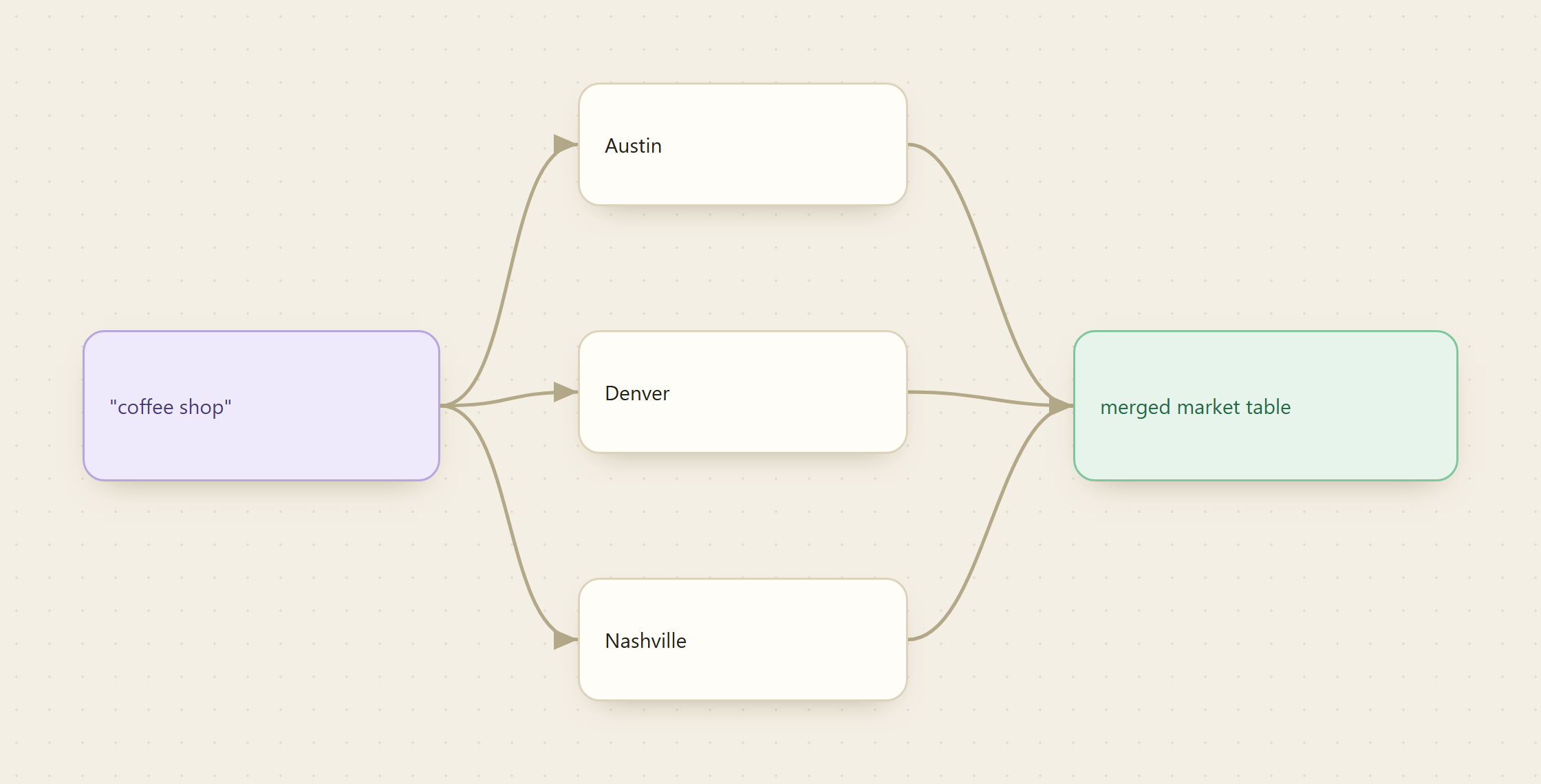
This is where per-result billing changes the shape of the job. Because a sweep costs a small fraction of a cent per row, running the same call across a list of cities is cheap, so a lead list becomes a market map with a loop instead of a rewrite.
for city in "Austin, TX, USA" "Denver, CO, USA" "Nashville, TN, USA"; do
  slug=$(echo "$city" | cut -d, -f1 | tr 'A-Z ' 'a-z-')
  monid run -p apify -e /damilo/google-maps-scraper \
    -i "{\"query\": \"coffee shop\", \"location\": \"$city\", \"max_results\": 200}" -w \
    -o "coffee-$slug.json"
done
Swap the fixed query for a second loop over categories ("coffee shop", "cafe", "roastery") and one script covers a whole vertical across a whole region. The output is one file per city-and-category pair, each a table with the same columns, ready to concatenate. That is the difference between chasing one list and mapping a market: same endpoint, same fields, more inputs.
What a listings sweep costs
Per-result billing makes the math simple: you pay for the businesses you keep, and max_results is that number. The endpoint bills a small fraction of a cent per result, so a single 200-row city pull lands well under a dollar, a ten-city sweep at 200 each lands in low single-digit dollars, and a test pull while you tune the query is pocket change. There is no seat license, no monthly minimum, and a week with zero runs costs zero. Current per-endpoint pricing lives at monid.ai/tools, and because inspect shows the price before you run, there are no surprises.
| Job shape | Rough magnitude |
|---|---|
| A 120-row test pull for one city | a small fraction of a cent per row |
| A full 200-row city sweep | under a dollar |
| Ten cities at 200 each | low single-digit dollars |
| A category mapped across a region | single-digit dollars |
Because Monid also ships as an MCP server, an agent handed "build me a list of every coffee shop in these five cities with phone and website" can discover this endpoint, inspect the schema, run the sweep per city, and hand back the merged table on its own.
FAQ
Do I need a Google Maps API key? No. The Apify actor runs without one. You bring a single Monid account and a pay-as-you-go balance, and the provider owns the scraping infrastructure and parser upkeep.
Which fields come back per business? Name, full address, phone, website, geographic coordinates, star rating, review count, business category, weekly opening hours, images, and provider-specific identifiers. For a lead table, name, category, address, phone, website, rating, and review count are the core seven.
How do I control cost?
With max_results. It caps the number of businesses returned and is exactly what you are billed for, so you set your ceiling before the run starts. Start small to tune the query, then widen it once the results look right. Current prices are at monid.ai/tools.
Can I target one specific place instead of a search?
Yes. Pass a place_id or cid if you already have a Google Maps identifier for the location, instead of a query and location pair. The query plus location shape is what you want for discovery across an area.
Can an agent run this? Yes. Monid ships as an MCP server, so an agent can discover the endpoint, inspect the schema, and run the sweep across a list of cities without you writing the loop. See monid.ai/SKILL.md.
Try it
Run a free monid discover for "google maps business listings", inspect damilo/google-maps-scraper to confirm the fields and price, then pull 120 businesses for a category and a city you know well. If the table matches what you would find scrolling Maps, add a second city and let the loop build the market map. Start at monid.ai.