Automate SERP Tracking with a Structured Google Search API
Build a daily rank tracker with a structured Google search API: run context.dev per keyword, parse your position, diff for movement, and cron it.
You can build a working daily SERP rank tracker in an afternoon: run a structured Google search API per keyword, read the ranked results to find where your domain sits, append a dated row to a file, and diff today against yesterday to catch movement. No subscription, no dashboard you do not own, and you pay only for the searches you actually run.
The tool that makes this cheap is Monid. Monid is the OpenRouter for agent tools where one interface and one balance reach over a thousand tools, so you can call a structured search endpoint without a per-vendor signup. For rank tracking, the endpoint you want is context.dev /web/search, which returns live, ranked web results carrying a url, title, and relevance score per hit.
TL;DR
- Define a keyword list and the one domain you track (yours or a competitor's).
- Call
context.dev/web/searchper keyword withnumResultsand a 2-lettercountryfor localization. - Parse the ranked array: the index is the rank, and each item carries
url,title, andrelevance. - Extract your position with a one-line
jqfilter on the saved JSON. - Append a dated row to a CSV or JSON store, then diff today vs yesterday for movement.
- Schedule the loop on a cron. Inspecting is free; each search is a fraction of a cent, so cost stays in single-digit dollars for months of tracking.
Why Google's own tools do not cover live rank tracking
Most people reach first for the Google Custom Search JSON API or Search Console, and both leave a gap. Search Console only reports positions for pages you already own and verify, so you cannot watch a competitor climb or see the full SERP around you, and its position numbers are averaged and lagged by days. The Custom Search JSON API queries a Programmable Search Engine you configure, not the live google.com ranking, and its free tier caps you at 100 queries per day before it stops. Neither gives you a clean, ranked array you can diff on a schedule without stitching quota, billing, and a search-engine config together first.
A structured search endpoint sidesteps all of that. You send a query, you get back an ordered list of real results with scores, and you own the storage and the diff logic. That is the whole recipe below.
📖 See also the Apify alternatives compared if you are choosing where to run this on a schedule.
Set up Monid once
Copy this line to your agent to build a daily rank tracker.
set up https://monid.ai/SKILL.md and use context.dev/web/search to track your keyword rankings on Google
For agents
Grab an API key at app.monid.ai, then paste this to your agent and hand it the key:
set up https://monid.ai/SKILL.md
It learns the whole discover, inspect, run workflow itself. More details in the agent quickstart.
For humans
npm install -g @monid-ai/cli
monid keys add --label main --key <your-api-key>
More details in the CLI quickstart.
How to build the rank tracker, step by step
Step 1: Inspect the endpoint (free)
Look at the input schema and the shape of the results before you spend anything. Inspecting costs nothing.
monid inspect -p context.dev -e /web/search
You will see the accepted fields: query, numResults (10 to 100), and country as a 2-letter code. The response is a results array, already ranked, where each entry carries url, title, and relevance.
Step 2: Run one keyword and read the ranked results
Pick a real tracking query, set your locale, and write the output to a file.
monid run -p context.dev -e /web/search -i '{"query":"best crm for startups","numResults":20,"country":"us"}' -w -o serp.json
The array order is the ranking. Position 1 is results[0], position 2 is results[1], and so on. The relevance score tells you how strongly the endpoint matched each page to the query, which is useful for spotting near-miss results that are one edit away from ranking. The country field matters more than people expect: the same query localized to us, gb, and de returns different orderings, so track each market you care about as its own keyword row.

Step 3: Extract your domain's position with jq
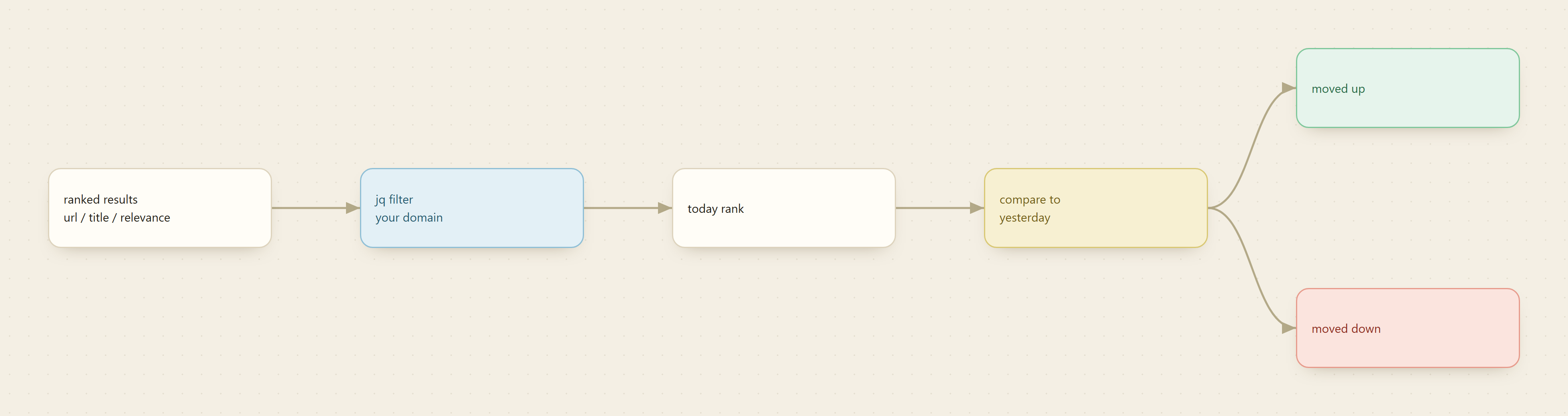
You do not care about all 20 results, only where your domain lands. This one-liner walks the ranked array, matches your host, and prints the 1-based rank.
jq '.results | to_entries[] | select(.value.url | test("yourdomain.com")) | {rank: (.key+1), url: .value.url}' serp.json
If the filter returns nothing, you are not in the top numResults for that keyword, which is itself a data point (record it as "unranked" or a sentinel like 999 so your diff still works). Swap yourdomain.com for a competitor's host and you have a competitor tracker with the same command.
Step 4: Loop your keyword list
Keep your targets in a plain file, one query per line, and run the search for each. Small numResults keeps calls fast and cheap; 20 is plenty when you only need to know if you are on page one or two.
monid run -p context.dev -e /web/search -i '{"query":"crm for small teams","numResults":20,"country":"us"}' -w -o serp.json
Rotate the -o filename per keyword and per day (for example crm-for-small-teams-2026-08-03.json) so nothing overwrites.
Step 5: Store dated rows and diff for movement
After each jq extraction, append one row to a CSV: date, keyword, country, rank, url. That flat store is your whole history. To catch movement, join today's rows to yesterday's on keyword plus country and subtract the ranks. A negative delta means you moved up (rank 8 to rank 4 is minus 4), a positive delta means you slipped, and an appearance or disappearance flags a new entry or a drop off the tracked window. Alert yourself only when the absolute delta crosses a threshold you set, so a single position of daily noise does not page you.
Step 6: Schedule it on cron
Wrap Steps 4 and 5 in a script and run it once a day. On Linux or macOS, a crontab line like 0 8 * * * fires it every morning at 8. On Windows, Task Scheduler does the same. Each run reads the keyword file, calls the endpoint per keyword, extracts ranks, appends dated rows, and diffs against the previous day. That is the full loop with no dashboard and no seat license.
What does daily SERP tracking cost
Here is the tally in magnitudes. Inspecting the endpoint is free. Each /web/search call for ten to twenty results costs a fraction of a cent, so a run over a keyword list is cents per day. Multiply by your list size and by the days you track: a 20-keyword list checked daily for a full month is a few hundred calls, which lands in single-digit dollars total. Because you pay per call, a paused tracker costs nothing, and adding a keyword or a second country just adds a few more cents per day. See live per-call pricing on the Monid tools directory.
FAQ
Does context.dev return the real live Google ranking?
It returns live, ranked web search results with a url, title, and relevance per hit, ordered by rank. You read position from the array index, which is exactly what a rank tracker needs.
How do I track different countries?
Set the country field to a 2-letter code (us, gb, de) and run the same query once per market. Store each as its own dated row, since localized SERPs differ.
How many results should I request?
Keep numResults small, 10 to 20, if you only need to know whether you are on page one or two. The endpoint accepts up to 100 when you want deeper coverage, but larger pulls cost slightly more per call.
Do I need an API key for both agents and humans? Yes. Grab one at app.monid.ai. Agents load the skill from monid.ai and run the workflow themselves; humans use the CLI. The same wallet backs both.