Automate Short-Form AI Video Generation From a Text Prompt
Generate a short-form product video from a text prompt with ByteDance Seedance on Monid, billed per call. Pick resolution, poll, download the MP4.
You can turn a sentence into a finished, audio-synced MP4 with one API call and no GPU of your own. Point ByteDance Seedance at a text prompt, pick a resolution, wait tens of seconds, and download a short-form clip ready for TikTok, Reels, or an ad slot. Monid is the OpenRouter for agent tools: one interface and one balance reach over a thousand tools across scraping, enrichment, and generative media, with no separate signup per vendor. This is a hands-on cookbook for the whole video job, from writing the prompt to holding the MP4.
Copy this line to your agent to generate a short-form product video from a prompt.
set up https://monid.ai/SKILL.md and use bytedance /v1/video/seedance-2.0-mini to generate a 5-second 720p product video from a text prompt, then give me the MP4 url
TL;DR
bytedance /v1/video/seedance-2.0-minitakes a text prompt and returns a downloadable MP4 with synchronized audio, up to 720p.- The body is a
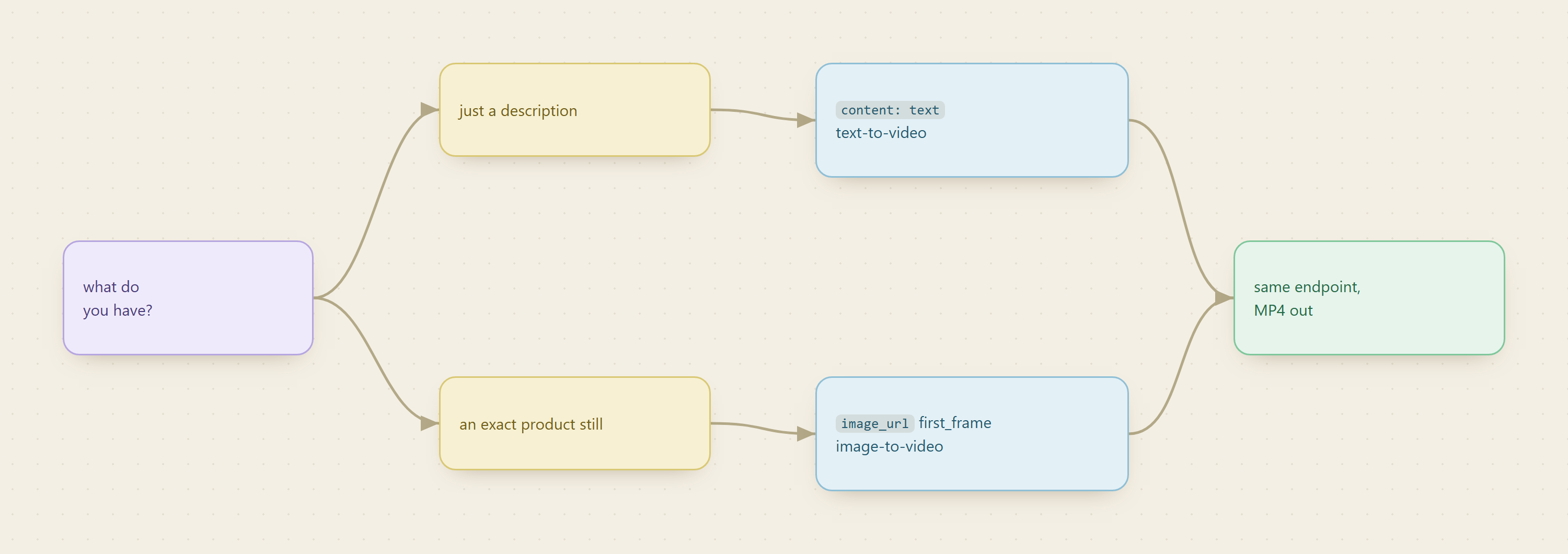
contentarray. A{"type":"text","text":"..."}item is a text-to-video prompt; swap in animage_urlitem to animate a still instead. - Dialogue you put in double quotes inside the prompt drives the generated audio, so the voice track is written the same place as the visuals.
resolution(480por720p) is both the quality knob and the price selector;duration(4 to 15 seconds) andratio(16:9,9:16, and so on) shape the clip.- Billing is per token by resolution, so cost tracks pixels times seconds. A short 720p clip lands at a few dollars, current magnitudes at monid.ai/tools.
- The alternative is standing up a local diffusion-video pipeline (GPUs, model weights, orchestration) yourself. This is one call on a shared balance instead.
Set up once
For agents
Grab an API key at app.monid.ai, then paste this to your agent and hand it the key:
set up https://monid.ai/SKILL.md
It learns the whole discover, inspect, run workflow itself. More details in the agent quickstart.
For humans
npm install -g @monid-ai/cli
monid keys add --label main --key <your-api-key>
More details in the CLI quickstart.
📖 See also how API marketplaces compare for agents
Step 1: Write the prompt, including the dialogue
The prompt is the whole creative brief, and it does double duty. Describe the shot the way a director would, camera, subject, motion, light, and put any spoken line in double quotes so the model knows to voice it. Seedance generates synchronized audio by default, so a line in quotes becomes an actual voice track in the clip, not a caption.
A product spot for a matte black water bottle might read like this:
a cinematic product shot of a matte black water bottle rotating slowly on a
marble kitchen counter, soft morning daylight from the left, shallow depth of
field. a calm voice says "hydration, redesigned."
The descriptive half controls the visuals; the quoted half controls the audio. Keep prompts under about 1000 words (the field caps at 6000 characters), and be concrete about motion, since a still-sounding prompt tends to produce a static-looking clip.
Step 2: Inspect the schema for free, then confirm the price
Inspect is free and does not touch your balance, so check the input shape and the live per-token rate before you spend.
monid inspect -p bytedance -e /v1/video/seedance-2.0-mini
# -> input schema, field docs, and the per-token price matrix (free)
Two things in that output matter before your first run. The content array is the only required field, and resolution is the price selector: 480p and 720p are billed at the same per-token rate, but 720p simply spends more tokens for the same second of video, because tokens scale with pixels. Roughly, tokens are width times height times 24fps times seconds, so a 720p 16:9 second is about 21,600 tokens.
Step 3: Run the text-to-video generation
run is the only step that bills. The -w flag waits for the job and prints the result when it lands. This is the exact verified command, one text item in the content array:
monid run -p bytedance -e /v1/video/seedance-2.0-mini \
  -i '{"content":[{"type":"text","text":"a cinematic product shot of a matte black water bottle rotating on a marble counter, soft daylight"}]}' -w
# -> COMPLETED: a video_url (MP4) plus usage tokens, billed per token by resolution
To take control of the format instead of the defaults, add the top-level fields alongside content:
monid run -p bytedance -e /v1/video/seedance-2.0-mini \
  -i '{"content":[{"type":"text","text":"a matte black water bottle rotating slowly on a marble counter, soft morning daylight, a calm voice says \"hydration, redesigned\""}],"resolution":"720p","duration":6,"ratio":"9:16"}' -w
The fields that shape the output:
resolution:480pfor cheap drafts and bulk variations,720pfor the take you actually ship. This is also what moves the bill.duration: 4 to 15 seconds. Short-form wants short, and duration multiplies tokens linearly, so a 6-second clip costs roughly half of a 12-second one.ratio:9:16for TikTok, Reels, and Shorts,16:9for YouTube and landing pages,1:1for feed tiles. Omit it to let the model pick.generate_audio: on by default, no price impact. Set itfalseif you plan to score the clip with your own music later.

Step 4: Poll for the finished MP4
Generation takes tens of seconds to a few minutes. With -w the CLI holds the connection and hands you the result when the job completes, so for a single clip there is nothing else to do. The completed run returns a video_url, a direct link to the MP4, plus the usage tokens you were billed for.
One thing to respect: that URL expires in about 24 hours. Download the file as soon as the run finishes rather than treating the link as permanent storage.
# -w already waited; grab the url from the result and save the file
monid run -p bytedance -e /v1/video/seedance-2.0-mini \
  -i '{"content":[{"type":"text","text":"a matte black water bottle rotating on a marble counter, soft daylight"}],"resolution":"720p"}' -w \
  -o clip.json
VIDEO_URL=$(jq -r '.video_url' clip.json)
curl -L "$VIDEO_URL" -o bottle.mp4
Now bottle.mp4 is on disk, sound and all, ready to trim or post. For a batch, drop the run into a loop over a list of prompts and let each -w call block until its clip is ready.
Step 5: The image-to-video variant
Text-to-video invents the scene. If you already have a product photo you want to keep exact, animate that still instead by swapping the text item for an image_url item with role: first_frame. The model treats your image as the opening frame and generates motion from there, so the bottle in the clip is your bottle, not a look-alike the model imagined.
monid run -p bytedance -e /v1/video/seedance-2.0-mini \
  -i '{"content":[{"type":"image_url","image_url":{"url":"https://yoursite.com/bottle.png"},"role":"first_frame"},{"type":"text","text":"the bottle rotates slowly, light glints across the matte finish"}]}' -w
You can mix a first_frame and a last_frame image to pin both ends of the motion, or pass reference_image items to steer style. Two rules from the schema save a wasted call: reference URLs must be public https:// links or asset:// ids (inline base64 is rejected), and stills containing real human faces are refused upstream, so use product shots or authorized assets.
📖 See also metered billing versus a subscription
What a clip costs
Seedance bills per token by resolution, and tokens are pixels times frames, so cost tracks the two dials you already set: resolution and duration. A short 720p clip lands in the few-dollars range; the same length at 480p is meaningfully cheaper, which is why the draft-at-480p, ship-at-720p habit is worth building. There is no subscription and no per-vendor minimum underneath it, and the exact price is shown before every run and listed at monid.ai/tools. If you want a cheaper, lower-fidelity option for volume drafts, MiniMax /v1/video_generation sits on the same Monid wallet, so you can rough-cut on the budget model and finish on Seedance without a second account.
Why not run your own video model?
Because the do-it-yourself path is a full diffusion-video pipeline, and the video part is the smallest part of it. You provision GPUs with enough memory to hold the weights, download and version the model, build the inference and queue orchestration, handle the audio-sync stack separately, and keep all of it patched as new checkpoints ship. That is a standing infrastructure bill and an on-call rotation for something you might run a few dozen times a week. A hosted call turns that whole stack into one line where you pay for the clip and nothing when you are idle, and where switching to a newer or cheaper model is a different provider string, not a migration.
FAQ
How do I add spoken audio to the video?
Put the line in double quotes inside your text prompt, for example a calm voice says "hydration, redesigned". Seedance generates synchronized audio by default, so the quoted text becomes a voice track in the clip. Set generate_audio to false if you want silent output to score yourself.
What resolution and aspect ratio should I pick?
Use 480p for drafts and bulk variations, 720p for the final. Set ratio to 9:16 for TikTok, Reels, and Shorts, 16:9 for YouTube and web, or 1:1 for feed tiles. Resolution is also the price selector, so drafting at 480p keeps costs down.
Can I animate my own product photo instead of a text prompt?
Yes. Replace the text item in content with an image_url item and role: first_frame. The image becomes the opening frame and the model generates motion from it. The URL must be a public https:// link, and stills with real human faces are rejected upstream.
How long does generation take and how do I get the file?
Tens of seconds to a few minutes. With the -w flag the CLI waits and returns a video_url pointing at the MP4. Download it promptly, since the link expires in about 24 hours.
How much does one clip cost? Billing is per token by resolution, so cost scales with pixels times seconds. A short 720p clip is a few dollars, 480p is cheaper, and there is no subscription. The exact price shows before every run and is listed at monid.ai/tools.
Try it
Grab a key at app.monid.ai, inspect the endpoint for free to see the live price, and generate one 5-second clip from a prompt you have in mind. If the MP4 looks right, wire the run into a loop over your prompt list and let each clip render on its own. Start at monid.ai.