Automate TikTok Comment Collection From a Video URL
Turn a TikTok video URL into a saved set of top-level comments and replies on a schedule, billed per call on Monid. No TikTok developer app.

Copy this line to your agent to collect the comments on any TikTok video.
set up https://monid.ai/SKILL.md and use apify/scraptik/tiktok-comments-scraper-api to collect the comments on a TikTok video by its aweme_id
Point one endpoint at a TikTok video ID and it hands back the comments on that post, page by page, each with the text, the author, the like count, and a timestamp. Monid is the OpenRouter for agent tools: one interface and one balance reach over a thousand tools across web scraping, enrichment, social data, and search, with no separate signup per vendor. TikTok comments are one of the endpoints we have verified ourselves, and this cookbook walks the whole job start to finish, from a URL in your clipboard to rows in a CSV on a schedule.
TL;DR
apify /scraptik/tiktok-comments-scraper-apireturns top-level comments and threaded replies for a TikTok video, with comment text, author metadata, engagement counts, and timestamps.- The only input the comment call needs is the
aweme_id, the numeric video ID that sits in every TikTok video URL. - It is billed per call at a fraction of a cent, so a full comment sweep of a busy video is still cents (current prices at monid.ai/tools).
- Pagination is a
cursorinteger you carry forward between calls until the page comes back empty. - Replies are a second call keyed on
comment_idplusaweme_id, so you only pay for reply depth on the threads that matter. - Monid ships as an MCP server, so an agent can run the whole collect-and-flatten loop mid-task or on a cron.
Set up once
For agents
Grab an API key at app.monid.ai, then paste this to your agent and hand it the key:
set up https://monid.ai/SKILL.md
It learns the whole discover, inspect, run workflow itself. More details in the agent quickstart.
For humans
npm install -g @monid-ai/cli
monid keys add --label main --key <your-api-key>
More details in the CLI quickstart.
📖 See also picking a social data API
Step 1: Pull the aweme_id out of the URL
Every TikTok video URL ends in the numeric ID this endpoint calls aweme_id. Take a link like:
https://www.tiktok.com/@jenni.ai/video/7127359192452599042
The trailing run of digits, 7127359192452599042, is the whole input. No handle, no scraping the page first. If your URL is a short vm.tiktok.com share link, open it once in a browser and copy the expanded address, or fetch it and read the Location header, then take the digits after /video/.
URL="https://www.tiktok.com/@jenni.ai/video/7127359192452599042"
AWEME_ID="${URL##*/video/}"
echo "$AWEME_ID"
# -> 7127359192452599042
Step 2: Check the schema, then pull the first page
Inspect is free, so confirm the input shape and the current per-call price before you spend anything.
monid inspect -p apify -e /scraptik/tiktok-comments-scraper-api
# -> input schema, field docs, and per-call price (free)
The comment call lives in the listComments_* section of the body. Fill in the video ID and how many comments you want on this page, and run it. This is the exact verified command:
monid run -p apify -e /scraptik/tiktok-comments-scraper-api \
  -i '{"listComments_awemeId":"7127359192452599042","listComments_count":50}' -w
# -> COMPLETED: up to 50 top-level comments,
#    each with text, author, like count, and timestamp,
#    billed per call
run is the only step that bills. The -w flag waits for the result and prints it. Every returned comment carries the four fields that make a comment set useful rather than decorative:
- Text: the comment body, ready to feed an LLM for sentiment, objections, or FAQ mining.
- Author: the commenter's username and user metadata, so you can weight or dedupe by account.
- Likes: engagement on the comment itself, which is how you surface the one objection a hundred people silently agree with.
- Timestamp: when it was posted, the axis you need to watch a comment section react over the hours after a video lands.

Step 3: Page through with the cursor
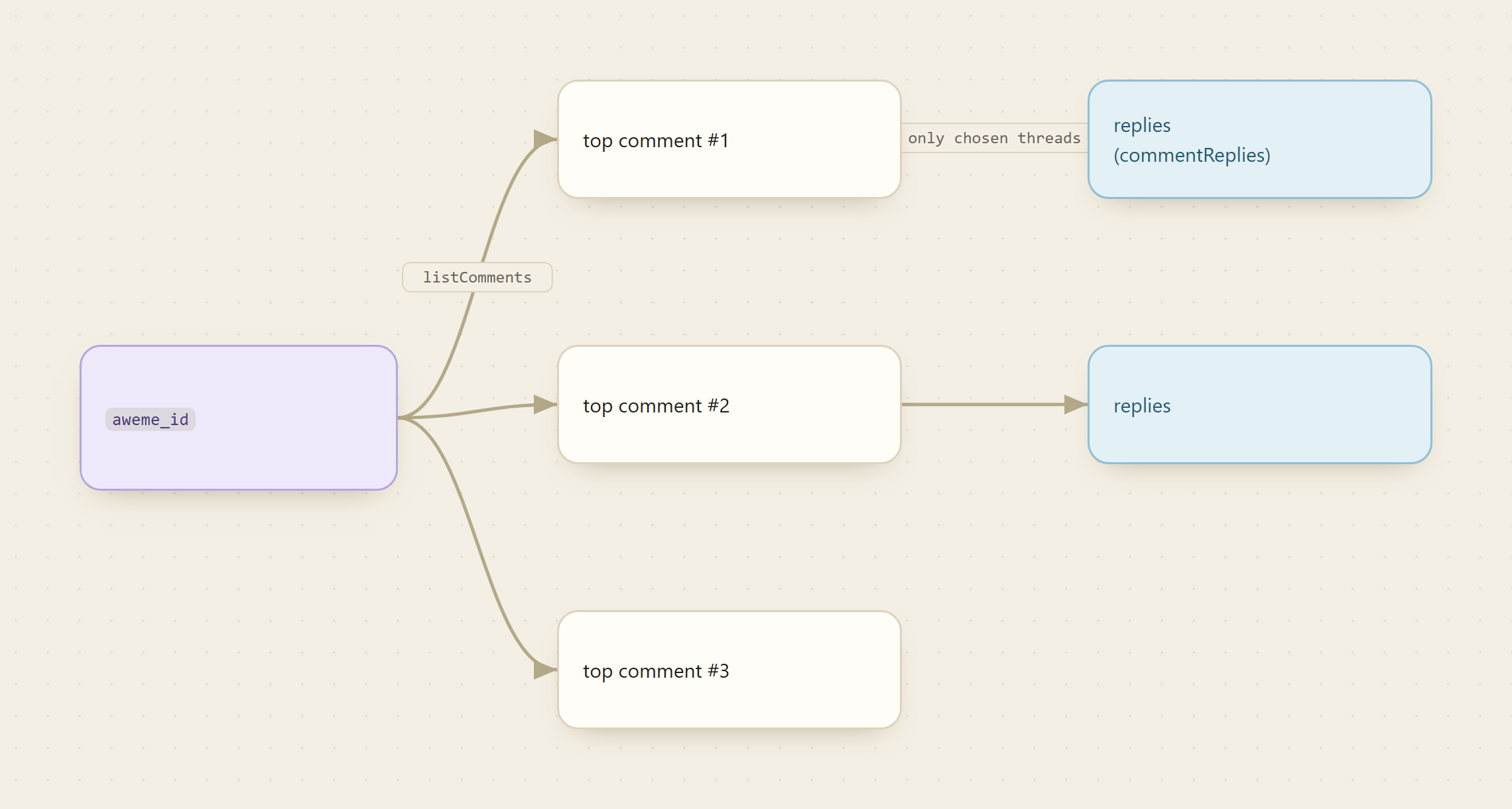
The default page is small, so a real collection means paging. The endpoint gives you a listComments_cursor integer for exactly this. Start at 0, and after each call carry the cursor forward by the count you requested. Keep going until a page comes back empty, which is the signal you have reached the end of the comment stream.
CURSOR=0
STEP=50
while : ; do
  monid run -p apify -e /scraptik/tiktok-comments-scraper-api \
    -i "{\"listComments_awemeId\":\"$AWEME_ID\",\"listComments_count\":$STEP,\"listComments_cursor\":$CURSOR}" -w \
    -o "page_$CURSOR.json"
  COUNT=$(jq '.comments | length' "page_$CURSOR.json" 2>/dev/null || echo 0)
  [ "$COUNT" -lt 1 ] && break
  CURSOR=$((CURSOR + STEP))
done
That loop writes one JSON file per page and stops on its own. Because billing is per call, a bigger count per page means fewer calls for the same coverage, so lean toward larger pages on videos you expect to be busy.
Step 4: Add replies for the threads that matter
Top-level comments are the map. The replies are where an argument actually plays out, and where a creator answers a buying question in public. Replies are a separate call keyed on the parent comment_id plus the same aweme_id. Pull the top-level page first, pick the comment IDs worth expanding (usually the highest-liked ones), and fetch their replies with the commentReplies_* fields.
monid run -p apify -e /scraptik/tiktok-comments-scraper-api \
  -i '{"commentReplies_commentId":"6999860547420766982","commentReplies_awemeId":"7127359192452599042","commentReplies_count":50}' -w
# -> COMPLETED: replies under that one comment,
#    same fields, same per-call price
Replies paginate the same way, with commentReplies_cursor. Keeping replies as a second, targeted call is deliberate: you never pay for reply depth on the hundred low-signal comments, only on the handful you chose.
Step 5: Flatten the JSON to clean rows
The per-page JSON is fine for a program to read, but analysis wants a flat table. Pull the four load-bearing fields out of every comment across every page and write one CSV. Field names vary slightly by response, so inspect one page first and adjust the jq paths to match what you actually got back.
echo "text,author,likes,created_at" > comments.csv
for f in page_*.json ; do
  jq -r '.comments[] | [.text, .user.nickname, .digg_count, .create_time] | @csv' "$f" >> comments.csv
done
wc -l comments.csv
# -> one row per comment, ready for a spreadsheet or an LLM
Now you have text, author, likes, and a Unix created_at in one file. Convert the timestamp to a date in your spreadsheet, sort by likes to see what the section actually cared about, or hand the whole column of text to a model and ask for the top five recurring themes.
Step 6: Put it on a schedule
Comment sections move most in the hours after a video posts, so a one-time pull misses the story. Drop steps 1 through 5 into a script and let cron run it. A daily re-pull of the same aweme_id, diffed against yesterday's CSV, gives you new comments and how the like counts shifted, which is a lightweight way to watch sentiment turn on a launch or a controversy.
# crontab -e, then add: pull one video's comments every morning at 9
0 9 * * * /home/you/tiktok-comments.sh 7127359192452599042
Because Monid is also an MCP server, the same job runs agent-shaped. Hand an agent "collect the comments on this TikTok video every morning and tell me what changed," and it can discover the endpoint, page the cursor, pull replies on the hot threads, and diff the result on its own, with the free discover and inspect steps letting it check the price before it ever spends.
📖 See also Apify Alternatives
What the whole collection costs
The comment call is billed per call at a fraction of a cent, and each call returns a full page of comments. So the bill is a function of pages, not comments. A video with a few hundred comments at 50 per page is a handful of calls, which lands in single-digit cents. Add reply pulls on ten hot threads and you are still in cents. A daily scheduled re-pull of one video runs pennies a week. The per-call price is always shown before the run and listed at monid.ai/tools, with no subscription and no per-vendor minimum underneath it.
Why not the official TikTok API?
Because it will not hand you the comments on a video you do not own. TikTok's developer platform is built around registered apps that pass review and users who log in and authorize them, which is the right design for building a consumer app and the wrong one for reading the public comment section of an arbitrary viral post. There is no supported endpoint that returns arbitrary public video comments without an approved app plus user auth, and the research-access route is gated to qualifying institutions. That gap is exactly why this endpoint, maintained by scraping specialists on Apify, exists: it does the access, proxy, and parser work so a video ID is the only input you supply.
FAQ
Do I need a TikTok developer account or an approved app? No. You integrate Monid once and fund one pay-as-you-go balance. The provider handles TikTok access, proxies, and parser upkeep, and the only input you supply is the numeric video ID.
Where do I find the aweme_id?
It is the run of digits at the end of any TikTok video URL, right after /video/. For a short share link, expand it in a browser first and copy the full address.
Can I get replies, not just top-level comments?
Yes. Replies are a separate call keyed on the parent comment_id plus the video's aweme_id, so you pull reply depth only on the threads you choose.
How do I collect more than the default page of comments?
Use the listComments_cursor integer. Start at 0 and carry it forward by your page size between calls until a page comes back empty.
How much does it cost? Per call, a fraction of a cent, and each call returns a full page, so a whole video's comments is usually single-digit cents. The current price shows before every run and is listed at monid.ai/tools.
Try it
Grab a key at app.monid.ai, inspect the endpoint for free, and pull one page of comments from a video you already know. If the text, authors, and like counts match what you see on TikTok, wire in the cursor loop and the daily cron. Start at monid.ai.