Export a YouTube Channel's Videos to CSV in One Run
A copy-paste cookbook: turn a YouTube channel id into a videos.csv with title, url, views, and duration, paging with continuation_token.

Copy this line to your agent to export a YouTube channel's full video list to CSV.
set up https://monid.ai/SKILL.md and use tikhub /api/v1/youtube/web_v2/get_channel_videos to export a channel's videos to a CSV
You can go from a YouTube channel id to a clean videos.csv with title, videoId, url, published, views, and duration in a single paginated run, no Google Cloud project and no quota units to budget. This is the whole recipe, start to finish, with the exact commands you run. The one thing that trips people up (the fields come back as human strings, not numbers) is handled in the flatten step below.
Monid is the OpenRouter for agent tools: one interface and one balance to discover and run over a thousand tools without a separate signup per vendor. Here you point one TikHub endpoint at a channel, page through it with a continuation_token, and pipe the result into CSV.
TL;DR
- One endpoint,
tikhub /api/v1/youtube/web_v2/get_channel_videos, returns a channel's videos withvideo_id,title,url,duration,view_count, andpublished_time. - The first response also carries a
channelblock; paginated pages drop it, so cache page one as your source of truth for channel-level data. - Feed the returned
continuation_tokenback in to walk the whole catalog, and stop when it comes back empty. view_countarrives as"343,369 views"andpublished_timeas"18 hours ago", so the flatten step strips the count to a plain integer.- Free to inspect, billed only on the paid run at a fraction of a cent per call. Live pricing is at monid.ai/tools.
Why not the official API
The YouTube Data API v3 can list a channel's uploads, but it makes you stand up a Google Cloud project, wire OAuth or an API key, and then spend from a fixed daily quota. Each project gets 10,000 units a day, and operations are priced in units, so a listing-heavy job burns through the ceiling faster than you would guess (unit costs). For a one-off export of channels you do not own, that setup is a lot of ceremony before the first row lands. The endpoint below skips all of it: no project, no OAuth, no unit accounting.
📖 See also YouTube Scraper: What the Data API Will Not Give You
Set up Monid once
For agents
Grab an API key at app.monid.ai, then paste this to your agent and hand it the key:
set up https://monid.ai/SKILL.md
It learns the whole discover, inspect, run workflow itself. More details in the agent quickstart.
For humans
npm install -g @monid-ai/cli
monid keys add --label main --key <your-api-key>
More details in the CLI quickstart.
Step 1: get the channel id
The endpoint keys off a channel id (the UC... string), not a @handle. If all you have is the handle, pull the id straight from the channel page:
curl -s "https://www.youtube.com/@maizenofficial/videos" \
  | grep -o '"channelId":"UC[^"]*"' | head -1
# -> "channelId":"UCJHBJ7F-nAIlMGolm0Hu4vg"
Copy the UC... value. If the channel URL is already in /channel/UC... form, the id is right there in the path and you can skip the grep.
Step 2: one call to see the shape
Run a single call first. This is a query-param endpoint, so the body goes in --query, and -w waits inline so the JSON comes straight back. Omit continuation_token on the first request to get page one.
monid run -p tikhub -e /api/v1/youtube/web_v2/get_channel_videos \
  --query '{"channel_id":"UCJHBJ7F-nAIlMGolm0Hu4vg","country_code":"US"}' \
  -w -o page_1.json
Look at what landed before you spend anything more:
jq '{channel: .channel.name, videos: (.videos | length), next: (.continuation_token != null)}' page_1.json
# -> { "channel": "Maizen", "videos": 30, "next": true }
Two things about this response are worth knowing up front, because they decide how the rest of the script behaves:
- The top-level
channelobject (name, description, handle, verified badge) is only on the first page. Paginated responses omit it, so treat page one as the record for channel-level data and do not expect it again. - Each video's
view_countis a display string like"343,369 views", andpublished_timeis relative, like"18 hours ago", not an absolute date. YouTube stopped shipping a per-video description in channel listings in 2026, sodescriptionis always empty here.
Step 3: page through the whole catalog
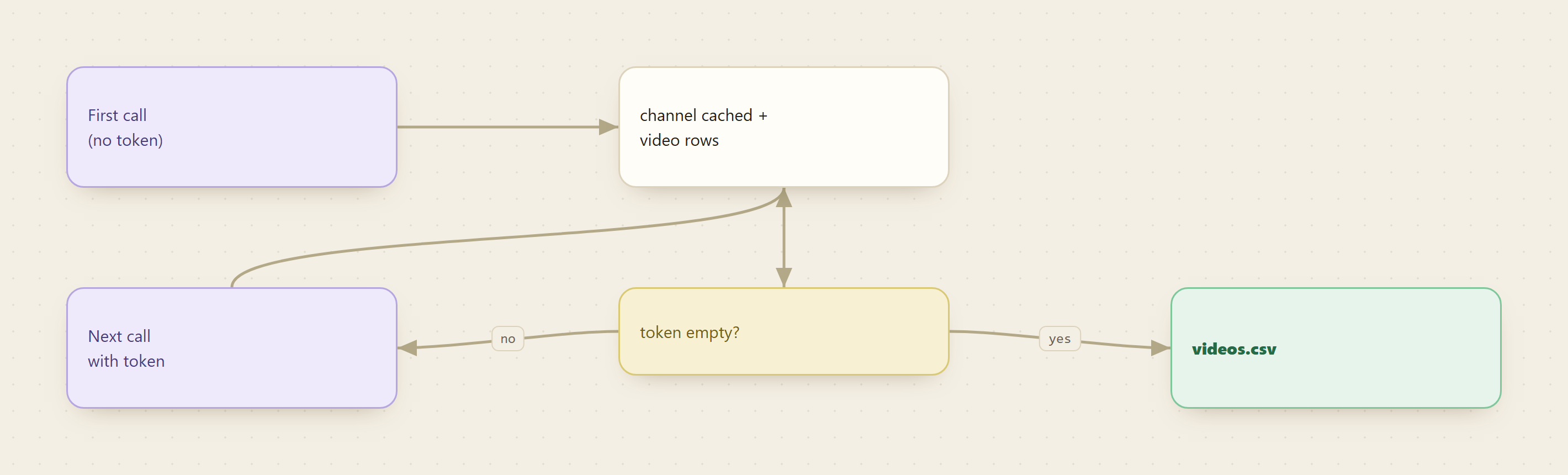
One page is 30-ish videos. To get the full list, take the continuation_token from each response and pass it into the next call. When the token comes back empty, you have reached the end.
token=$(jq -r '.continuation_token // empty' page_1.json)

monid run -p tikhub -e /api/v1/youtube/web_v2/get_channel_videos \
  --query "{\"channel_id\":\"UCJHBJ7F-nAIlMGolm0Hu4vg\",\"country_code\":\"US\",\"continuation_token\":\"$token\"}" \
  -w -o page_2.json
That is the whole pagination contract: read token, pass token, repeat. Step 5 wraps it in a loop so you do not do it by hand.
Step 4: flatten one page to CSV columns
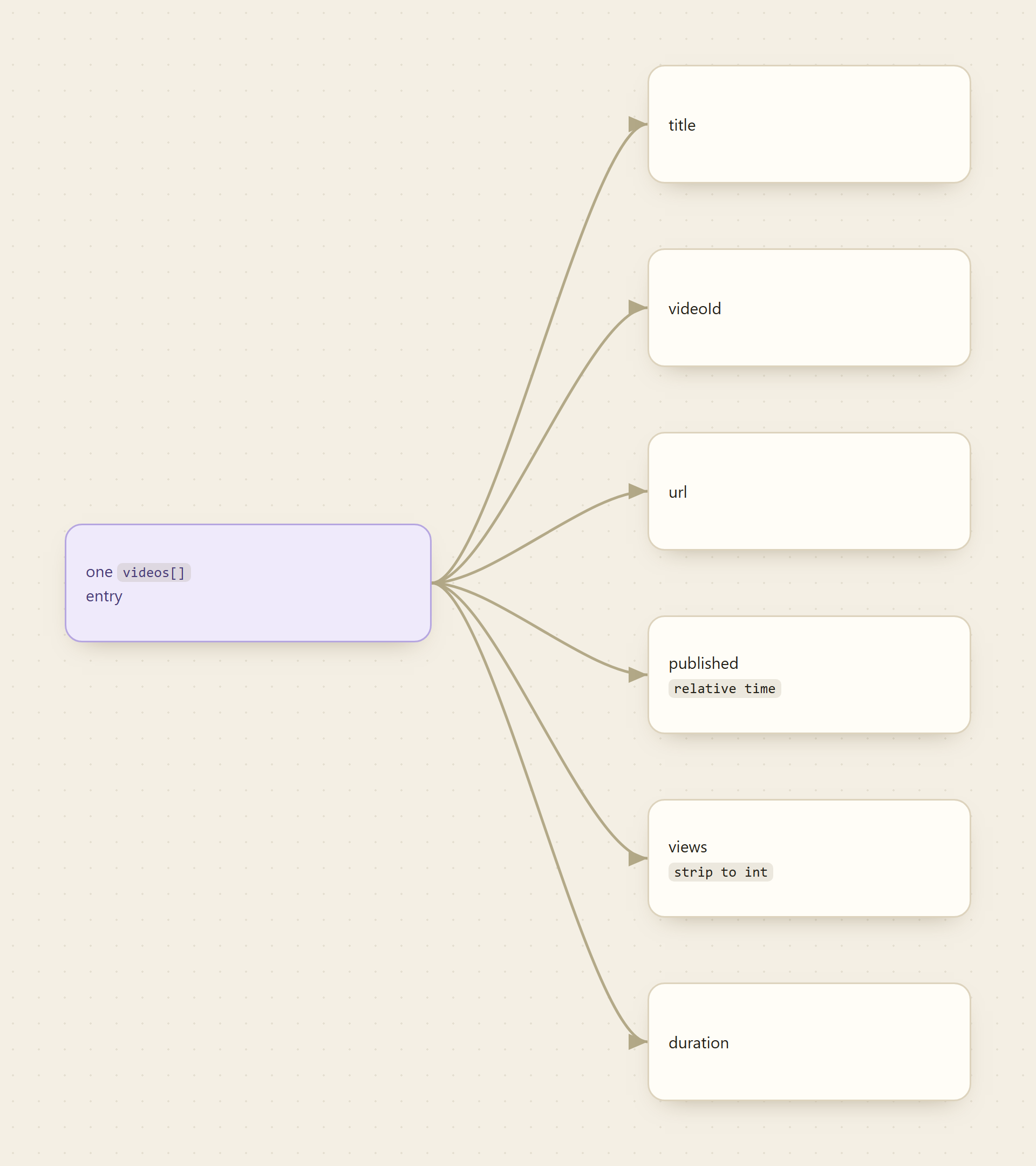
Pick the six columns you actually want and let jq emit proper CSV. The one transform that matters is on views: gsub("[^0-9]";"") throws away the commas and the word "views" so you get a plain integer you can sort and sum.
jq -r '.videos[] | [
  .title,
  .video_id,
  .url,
  .published_time,
  (.view_count | gsub("[^0-9]";"")),
  .duration
] | @csv' page_1.json
@csv quotes and escapes for you, so a comma inside a video title will not shift your columns. duration stays as "16:57" (minutes and seconds), which spreadsheets read fine as text; convert it to seconds later if you need to do math on it.
📖 See also What Is the Best API for Social Media Scraping in 2026?
Step 5: the full export script
Now assemble it. Write the header once, then loop: run a page, append its rows, read the next token, and break when the token runs dry.
CHANNEL="UCJHBJ7F-nAIlMGolm0Hu4vg"
echo 'title,videoId,url,published,views,duration' > videos.csv

token=""
page=1
while : ; do
  if [ -z "$token" ]; then
    q="{\"channel_id\":\"$CHANNEL\",\"country_code\":\"US\"}"
  else
    q="{\"channel_id\":\"$CHANNEL\",\"country_code\":\"US\",\"continuation_token\":\"$token\"}"
  fi

  monid run -p tikhub -e /api/v1/youtube/web_v2/get_channel_videos \
    --query "$q" -w -o "page_$page.json"

  jq -r '.videos[] | [.title, .video_id, .url, .published_time,
    (.view_count | gsub("[^0-9]";"")), .duration] | @csv' \
    "page_$page.json" >> videos.csv

  token=$(jq -r '.continuation_token // empty' "page_$page.json")
  [ -z "$token" ] && break
  page=$((page + 1))
done

echo "done: $(( $(wc -l < videos.csv) - 1 )) videos in videos.csv"
Open videos.csv in any spreadsheet and you have the channel's catalog: sort by the views column to find the outliers, filter by duration for shorts versus long-form, or keep the file and diff it next week to see what shipped. To limit an export to just the newest videos, stop the loop after one or two pages instead of running it to the end.
Cost tally
Everything before the run is free. Discovery and inspection cost nothing, so reading the schema and shaping the jq in Steps 2 and 4 does not touch your balance. The run is the only billed step, priced per call at a fraction of a cent. A single channel's full catalog is a handful of pages, so a complete export lands in the single-digit-cents range, and a batch of a few dozen channels is still a few dollars. There is no monthly floor and no per-vendor signup. Check current per-call pricing on monid.ai/tools before you widen the sweep.
FAQ
How do I turn a @handle into the channel id it needs?
Fetch the channel page and grep for "channelId":"UC...", as in Step 1, or read it out of a /channel/UC... URL directly. The endpoint always wants the UC... id, not the handle.
Why does the channel name disappear after the first page?
YouTube only returns channel-level metadata on the initial listing request. Paginated responses carry just the videos array and the next token, so cache page one for the channel name, bio, and verified badge.
Is published an exact date?
No. published_time is a relative string like "2 weeks ago", which is what the channel listing exposes. If you need an exact upload timestamp, take the video_id and call a video-detail endpoint; a free monid discover search shows the options.
How much does a full export cost? Inspect is free, and runs are billed per call at a fraction of a cent, so one channel's whole catalog is cents and a batch is a few dollars. Live pricing is on monid.ai/tools. Start at monid.ai.