Facebook Ad Library API vs Rolling Your Own Scraper
Official Meta Ad Library, a DIY scraper, or a per-result actor: an honest comparison of the three ways to pull Facebook ad data as JSON.
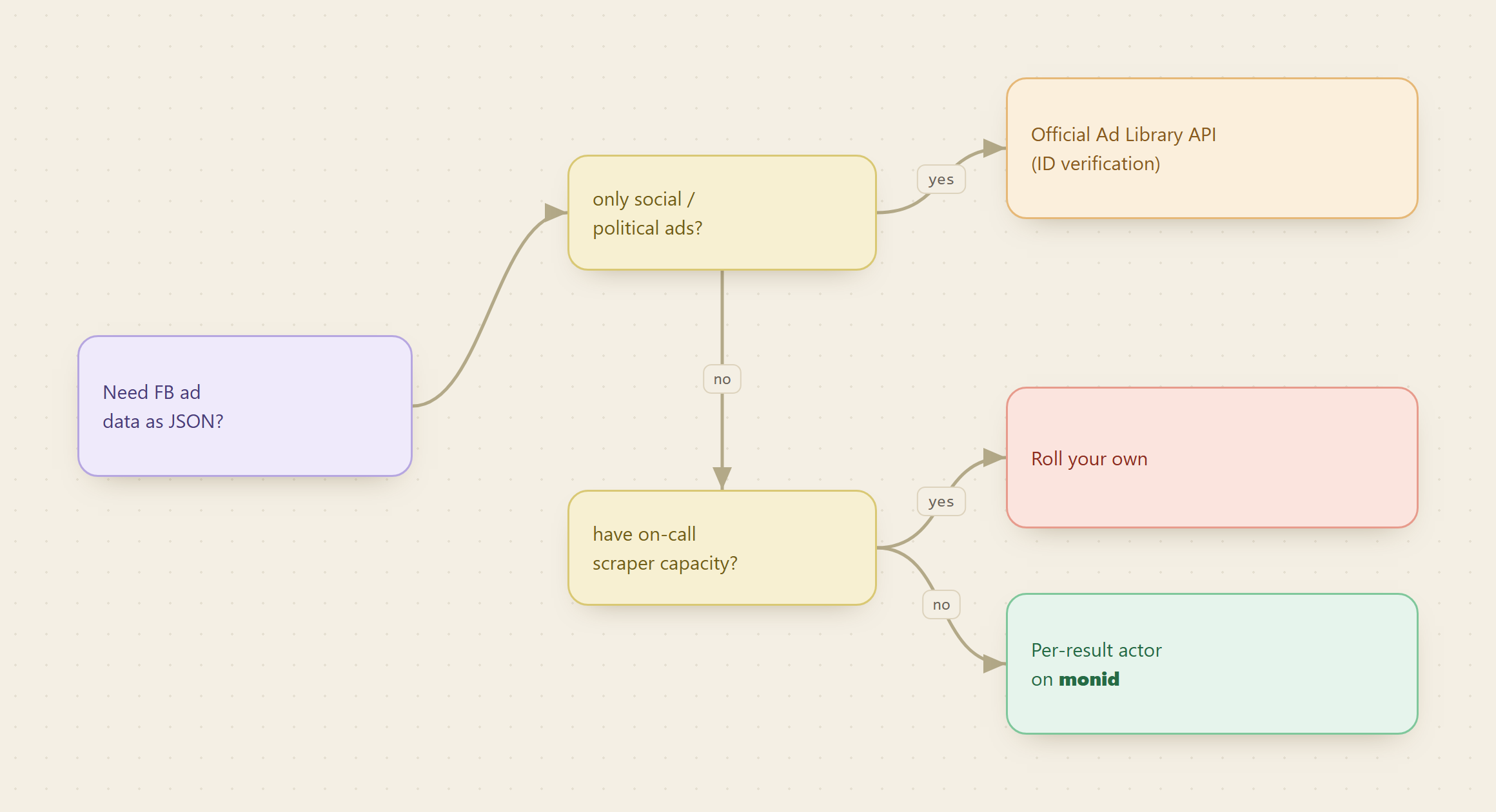
If you want Facebook ad data as clean JSON, there is no first-party API that gives it to you for a general keyword search, so the real choice is between building and maintaining your own scraper or renting one per result. The official Meta Ad Library is a browsing UI, its public API only covers social-issue, election, and political ads behind identity verification, and everything else is a scraping problem. This post lays out the three honest options and when each one wins.
Copy this line to your agent to compare pulling Facebook ad data yourself versus a per-result actor.
set up https://monid.ai/SKILL.md and use apify/curious_coder/facebook-ads-library-scraper to pull ad data for one keyword
TL;DR
- There is no first-party JSON API for general Facebook ad search. The official Ad Library API is scoped to social-issue, election, and political ads and requires identity confirmation, so commercial brand ads are out of reach through it.
- Rolling your own scraper works, but you are signing up for proxy rotation, a fragile HTML and payload parser, login and rate-limit handling, and a layout that Meta changes without warning. The code is the easy part; the upkeep is the cost.
- A per-result actor like Apify's facebook-ads-library-scraper hands you the same JSON without owning any of that maintenance. On Monid you call it through one balance, no separate Apify signup.
- Cost math: DIY has near-zero marginal cost per row but a real fixed cost in engineering time. The actor bills a fraction of a cent per result, so a bounded pull is a few cents and you pay nothing when nobody is running it.
- Pick DIY only if you have the on-call capacity to babysit a scraper. Otherwise the per-result route is cheaper once you count the maintenance you avoid.
📖 See also reading run duration as a profitability signal once you have picked how to get the data out.
Why the official API is not the answer for brand ads
Start here because it saves you a wrong turn. Meta does publish an Ad Library API, and people assume it is the clean feed they want. It is not, for most commercial use. The API only returns ads classified as social issues, elections, or politics, it requires you to confirm your identity and location before you get access, and it does not expose the ordinary product and brand ads that competitive research is usually about. The Ad Library web UI shows those brand ads to anyone, but it is built for one-off human browsing: you can search and scroll, but there is no documented endpoint that returns that view as bulk structured JSON.
So the honest framing is not "API versus scraper." For general brand and keyword ad data, the API does not compete. The real decision is how you scrape what the UI already shows you, and who maintains that scraper.
Monid is the OpenRouter for agent tools: one interface and one balance to discover and execute over a thousand tools without a separate signup per vendor, billed pay-as-you-go at the price shown before you run.
Option 1: roll your own scraper
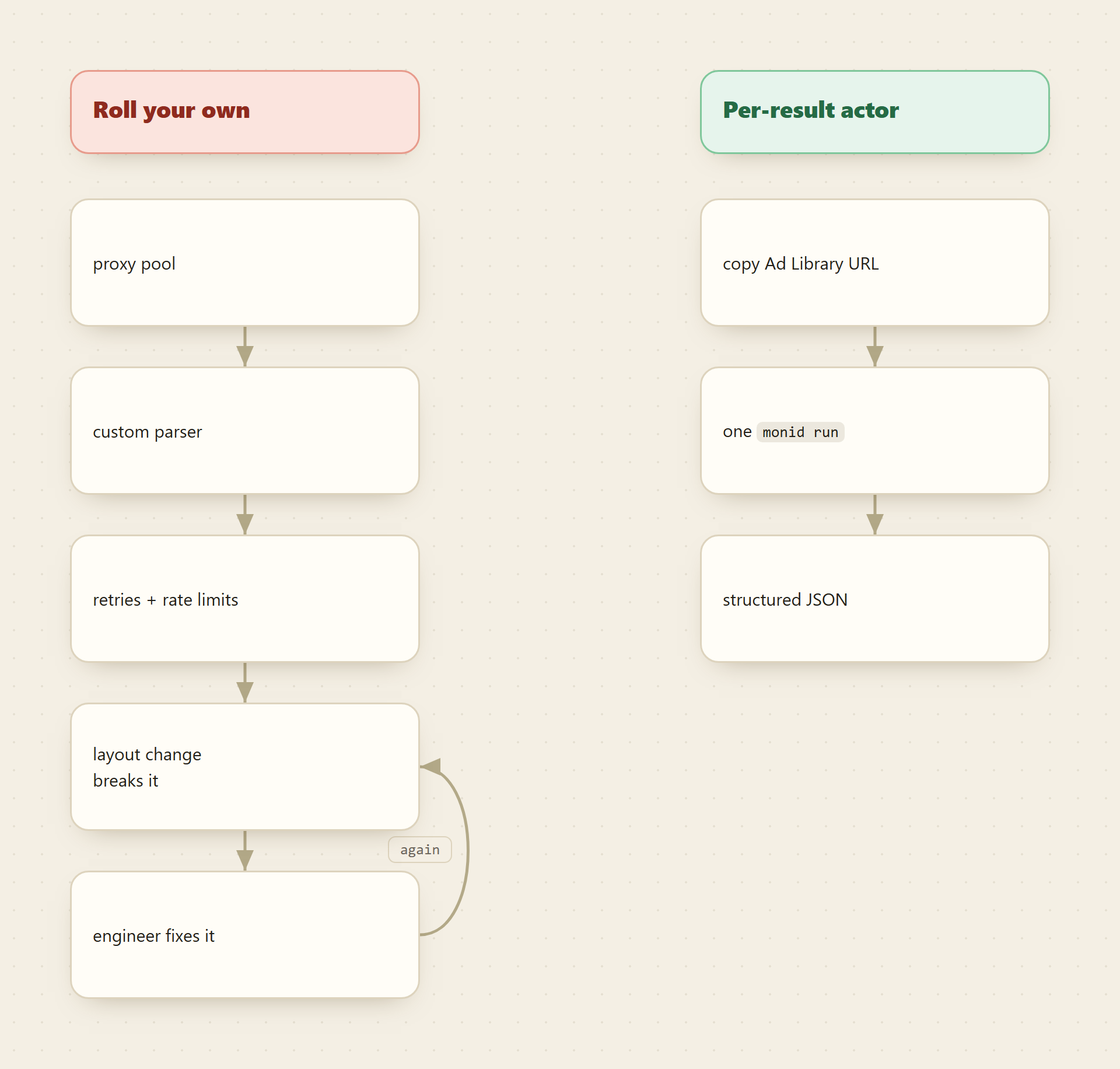
You can absolutely do this. The Ad Library loads its results from an internal endpoint, and with enough patience you can replay those requests and parse the payload. Here is what that actually commits you to, none of which shows up in a weekend prototype:
- Proxies. A single IP pulling ad results at any volume gets throttled fast. You need a rotating residential or datacenter proxy pool, which is its own subscription and its own reliability problem.
- A parser that drifts. The internal payload is undocumented and nested. You will write extraction logic against field paths that Meta is free to rename or restructure whenever it ships a UI change. When it does, your job silently returns empty or malformed rows until someone notices.
- Session and rate handling. Tokens expire, requests get challenged, and pagination cursors behave inconsistently across ad types and regions. Retry, backoff, and error classification are not optional extras; they are most of the code that keeps a scraper alive in production.
- Coverage edge cases. EU transparency and reach data, political labels, and multi-platform placement all come back in different shapes. Handling only the happy path means you quietly miss the fields that make the data useful.
The marginal cost per row is essentially free once it runs. The catch is that "once it runs" is not a stable state. It runs until Meta changes something, and then an engineer stops what they are doing to fix a parser. That recurring interruption is the true price of DIY, and it does not show up until week three.
Option 2: a per-result actor on Monid
The alternative is to let someone else own the proxy pool, the parser, and the layout-drift firefighting, and to pay only for the rows you actually pull. The Apify facebook-ads-library-scraper reads the same Ad Library UI and returns ad identifiers, archive metadata, category and political labels, timestamps and duration, spend and reach estimates, advertiser attributes, creative snapshots, and platform information as structured records. When Meta shifts its markup, keeping that scraper working is the maintainer's problem, not yours.
Monid puts that actor behind the same balance and interface as hundreds of other endpoints, so you do not open an Apify account or manage a second bill. discover and inspect are free; you only pay on run, and the price is shown before you spend.
For agents
Grab an API key at app.monid.ai, then paste this to your agent and hand it the key:
set up https://monid.ai/SKILL.md
It learns the whole discover, inspect, run workflow itself. More details in the agent quickstart.
For humans
npm install -g @monid-ai/cli
monid keys add --label main --key <your-api-key>
More details in the CLI quickstart.
Read the input shape first, for free, then run one bounded keyword pull. This endpoint takes a urls array of Ad Library search or page URLs and a count, and it bills PER_RESULT, so a small count keeps the bill small.
monid inspect -p apify -e /curious_coder/facebook-ads-library-scraper

monid run -p apify -e /curious_coder/facebook-ads-library-scraper \
  -i '{"urls":[{"url":"https://www.facebook.com/ads/library/?active_status=all&ad_type=all&country=US&q=nike&search_type=keyword_unordered&media_type=all"}],"count":50}' -w
The URL is just the Ad Library search you would run by hand, copied out of the browser: set country, q for your keyword, and the status and media filters, and the actor reads that exact query. Swap the keyword, keep count low on the first run, and confirm the fields before you scale. limitPerSource caps rows per URL if you pass several.
The three options side by side
| Official Ad Library API | Roll your own scraper | Per-result actor on Monid | |
|---|---|---|---|
| Covers brand and product ads | No, political and social issue only | Yes | Yes |
| Access requirement | Identity and location verification | Proxy pool plus your own code | One Monid API key |
| Who fixes layout drift | N/A | You, on their schedule | The actor maintainer |
| Marginal cost per row | Free within limits | Near zero once running | A fraction of a cent, per result |
| Fixed cost | Verification and API learning | Ongoing engineering upkeep | None |
| Time to first JSON | Days, if you qualify | Days to weeks | Minutes |
| Best fit | Political ad transparency work | Teams with on-call scraper capacity | Everyone else |
The table is a routing rule, not a scoreboard. If your work is genuinely about political and issue ads, the official API is the sanctioned path and you should use it. If you have engineers who already run scrapers and can absorb another one, DIY has the lowest marginal cost at high volume. For the common case, a bounded amount of brand ad data without a maintenance commitment, the per-result actor wins because the thing you are really buying is not the rows, it is the freedom from firefighting.
The cost tradeoff, reasoned honestly
DIY and the actor sit on opposite ends of the same tradeoff. DIY front-loads the cost into engineering time and pushes marginal cost toward zero. The actor front-loads almost nothing and charges a small amount per row.
Where the crossover sits depends on volume and cadence. For an occasional or bounded pull, the actor is plainly cheaper: a keyword search at a count of 50 is a few cents, and you pay nothing in the weeks you do not run it. See live per-result pricing at monid.ai/tools. For a very high, constant volume, the actor's per-result charge adds up, and a team that already operates scrapers might amortize a DIY build below it. But that comparison only holds if you honestly price the maintenance hours, the proxy subscription, and the days your data is quietly broken after a Meta change. Most teams overweight the code and underweight the upkeep, which is why the build looks cheaper than it is.
FAQ
Is there an official Facebook Ad Library API for all ads? No. The Ad Library API only returns ads about social issues, elections, and politics, and it requires identity verification. Ordinary brand and product ads are visible in the web UI but are not offered through a documented bulk JSON API.
Is scraping the Ad Library allowed? The Ad Library is a public transparency tool Meta publishes deliberately, and these approaches read what is already visible there. Keep queries bounded and stay within Meta's terms and your own legal guidance.
When does rolling my own actually make sense? When you have the on-call capacity to maintain it. If someone on the team already owns scrapers, can fix a parser the day Meta changes its markup, and you pull at constant high volume, DIY's near-zero marginal cost can win. Without that capacity, the maintenance eats the savings.
What does the per-result actor cost? A fraction of a cent per returned row, so a bounded keyword pull is a few cents and there is no charge when it is idle. Pricing is pay-as-you-go and shown before you run; current magnitudes are on monid.ai/tools.
Do I need an Apify account? No. The facebook-ads-library-scraper is reachable through one Monid wallet, billed pay-as-you-go without a separate Apify signup.
Inspect the endpoint for free, run one keyword at a count of 50, and check the returned fields against what your own scraper would have to reproduce. That comparison usually settles the buy-versus-build question on its own.