From Prompt to Product Shot: Generate Listing Images with MiniMax
A hands-on recipe: turn one product into a full text-to-image set of listing shots with MiniMax on Monid, sized 1:1, 9:16, and 16:9 for cents.
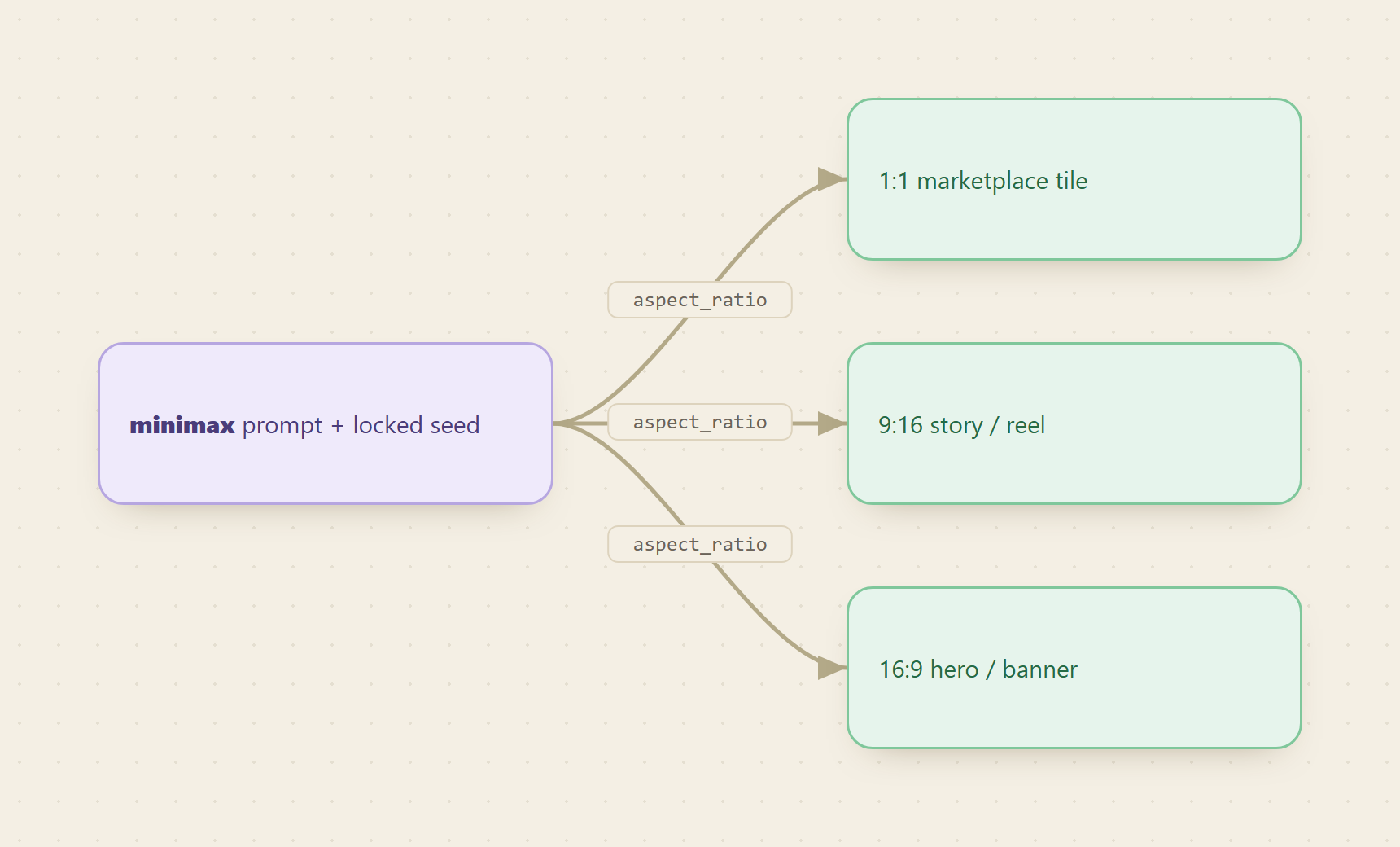
One good MiniMax prompt plus three aspect_ratio settings turns a single product into a full marketplace-ready image set, and the whole shoot costs cents, not a studio day. You write the scene once, ask for several variations in one run, lock the frame you like, then re-render it at every size your channels need.
Monid is a pay-per-call data API marketplace: one interface and one wallet reach hundreds of external data and generative-media endpoints, so you can call MiniMax image generation without a separate MiniMax account or contract.
TL;DR
- MiniMax turns a text prompt into product photos. You pay per image, a fraction of a cent each.
- A strong prompt names five things: subject, surface, background, lighting, and lens feel.
n(1 to 9) returns a spread of variations in a single run.seedreproduces the exact look later.aspect_ratiomaps to each slot:1:1for the marketplace tile,9:16for a story,16:9for a hero banner.response_format:"url"links expire in 24 hours.base64returns the image inline with no expiry.image-01-liveplussubject_referencekeeps a brand or character consistent across shots.

What goes into a product-shot prompt MiniMax can actually render?
A vague prompt ("photo of a water bottle") gives you a random object on a random table. A product prompt names five layers, and MiniMax renders each one it can see:
- Subject: the exact object with its material and finish. "Matte black insulated water bottle," not "bottle." Material words (matte, brushed, frosted, glossy) drive the reflections.
- Surface: what it sits on. "White seamless background" reads as a studio sweep. "Weathered oak" or "polished concrete" changes the whole story.
- Background: depth behind the subject. Seamless for a clean tile, "soft blurred kitchen" for lifestyle context.
- Lighting: direction and quality. "Soft key light" is flattering and even. "Hard rim light from the left" carves an edge. This is the lever that separates amateur from studio.
- Lens feel: "subtle reflection," "shallow depth of field," "shot on 85mm," "product photography." These cues push the model toward a commercial look instead of a snapshot.
Keep it to one or two sentences of concrete nouns. Adjective soup ("stunning, professional, high-quality, award-winning") wastes tokens and confuses the render. The recipe below uses exactly these five layers.
Set up Monid once
Copy this line to your agent to generate a set of product listing images from one prompt.
set up https://monid.ai/SKILL.md and use minimax /v1/image_generation to generate product listing images
For agents
Grab an API key at app.monid.ai, then paste this to your agent and hand it the key:
set up https://monid.ai/SKILL.md
It learns the whole discover, inspect, run workflow itself. More details in the agent quickstart.
For humans
npm install -g @monid-ai/cli
monid keys add --label main --key <your-api-key>
More details in the CLI quickstart.
How do you check the endpoint before spending? (Step 1, free)
Inspecting a schema on monid.ai is free. Only a run charges. Read the input fields, valid aspect_ratio values, the n range, and both response_format options before you commit a single call:
monid inspect -p minimax -e /v1/image_generation
Note which model ids exist (image-01 for text to image, image-01-live for reference-guided shots), what n maxes out at, and how the response returns the image. That one free read saves you from a run that produces the wrong size or an expired link.
Step 2: Shoot the first studio frame at 1:1
Start with your marketplace tile, which is almost always square. Feed the five-layer prompt, set aspect_ratio to 1:1, and ask for a small spread with n. The -w flag waits for the result so you get URLs back in one shot:
monid run -p minimax -e /v1/image_generation -i '{"model":"image-01","prompt":"studio product photo of a matte black insulated water bottle on white seamless background, soft key light, subtle reflection","aspect_ratio":"1:1","n":4}' -w
n:4 returns four takes of the same scene. This is your contact sheet. Pick the one where the reflection, crop, and lighting read best.
Step 3: Get variations with n, then lock the winner with seed
n is the cheapest art director you will ever hire. One run, several compositions, and you only pay per image returned. When you find the frame you want to keep, note its seed and pass it back so MiniMax reproduces that exact look on demand. Same prompt plus same seed equals the same base image, which lets you iterate one variable at a time:
monid run -p minimax -e /v1/image_generation -i '{"model":"image-01","prompt":"studio product photo of a matte black insulated water bottle on white seamless background, soft key light, subtle reflection","aspect_ratio":"1:1","n":1,"seed":42}' -w
With the seed locked, you can nudge the prompt (swap "soft key light" for "warm side light") and see only that change, not a brand-new random scene. That reproducibility is what turns a lucky render into a repeatable house style.
Step 4: Re-shoot each slot by changing aspect_ratio
Here is the payoff. You do not re-photograph anything. You keep the prompt and seed and change one field to fill every destination:
1:1for the marketplace or product-grid tile.9:16for an Instagram or TikTok story and reels.16:9for a website hero or an ad banner.
monid run -p minimax -e /v1/image_generation -i '{"model":"image-01","prompt":"studio product photo of a matte black insulated water bottle on white seamless background, soft key light, subtle reflection","aspect_ratio":"9:16","seed":42}' -w
Run it again with "aspect_ratio":"16:9" for the banner. One scene, three native crops, no cropping in Photoshop and no awkward letterboxing.
Step 5: Download within 24 hours, or go base64
By default MiniMax returns a hosted url, and that link expires after 24 hours. If you are generating now and placing images later, that clock matters. Two ways to handle it:
- Download immediately. Pull each returned URL into your asset folder as soon as the run finishes.
- Skip the clock entirely. Add
"response_format":"base64"and the image comes back inline as encoded data with no expiry. Decode it straight to a.png. This is the safer default for any pipeline that stores results in a database or hands them off between steps.
monid run -p minimax -e /v1/image_generation -i '{"model":"image-01","prompt":"studio product photo of a matte black insulated water bottle on white seamless background, soft key light, subtle reflection","aspect_ratio":"1:1","response_format":"base64"}' -w
Step 6 (optional): Keep the brand consistent with image-to-image
Selling a line of products or a character-branded set? Switch to image-01-live and pass a front-facing reference so the same subject or mascot carries across every shot. subject_reference takes a public image URL or a data: URL:
monid run -p minimax -e /v1/image_generation -i '{"model":"image-01-live","prompt":"product photo of the same bottle held by our brand mascot, soft studio light","aspect_ratio":"1:1","subject_reference":[{"type":"character","image_file":"<public url or data: url>"}]}' -w
Use a clean, well-lit, front-facing portrait as the reference. Busy or off-angle references give MiniMax less to anchor on and the consistency drops.
What does a full set cost?
Every render charges per image, driven by n. Real magnitudes, from a discovery to a finished set:
- Inspect the schema: free.
- One studio image: a fraction of a cent.
- A four-take contact sheet (
n:4): still a fraction of a cent per take, so a few cents total. - A dozen finished shots across
1:1,9:16, and16:9: single-digit cents for the whole set.
You pay only for images MiniMax returns, on the same wallet you already funded, with no MiniMax subscription and no per-vendor minimum. Live per-endpoint rates are on monid.ai/tools.
FAQ
Does n cost more? Yes, proportionally. n:4 returns and charges for four images. It is still a fraction of a cent each, and it is far cheaper than four separate runs plus your time picking between single renders.
How do I get the exact same image twice? Reuse the same model, prompt, and seed. That triplet reproduces the base render, so you can change aspect_ratio for a new slot while keeping the look identical.
My image URL stopped working. What happened? Hosted url links expire after 24 hours. Download right after the run, or pass "response_format":"base64" to get the image inline with no expiry.
Do I need a MiniMax account? No. Monid brokers the call on one wallet and one API key. Inspect the endpoint for free, then run when you are ready.