Give Your Product a Lifelike Voice With the ElevenLabs Text to Speech API
Turn any product copy into lifelike MP3 audio with the ElevenLabs text to speech API through Monid: pick a voice, run one metered call, get a signed download link.
Any string of product copy can become a lifelike, downloadable MP3 with a single metered call, no audio pipeline and no ElevenLabs contract to sign.
Paste this to your agent to teach it Monid and have it voice your product copy through ElevenLabs end to end.
set up https://monid.ai/SKILL.md and use elevenlabs to give your product a lifelike voice
Monid is the OpenRouter for agent tools: one integration and one balance reach over a thousand tools, so you call ElevenLabs the same way you would call any other tool, and you only pay when audio actually comes back.
TL;DR
- Provider
elevenlabs, endpoint/text-to-speechturns up to 5,000 characters of text into an MP3 saved on Monid cloud, returned as an audio object with a fresh signeddownload_link. - Use
/voicesfirst (free) to list the voices on your account and pick avoice_id. - Billing is per character, in the range of cents per thousand characters, and the flash model is half the price of the quality model. See the live number at monid.ai/tools.
- Three models cover three jobs:
eleven_multilingual_v2for quality,eleven_flash_v2_5for cheap low-latency volume,eleven_v3for expressive multi-language. - Discover and inspect are free, so you only spend on the one
runthat produces sound.
Set up Monid once
For agents
Grab an API key at app.monid.ai, then paste this to your agent and hand it the key:
set up https://monid.ai/SKILL.md
It learns the whole discover, inspect, run workflow itself. More details in the agent quickstart.
For humans
npm install -g @monid-ai/cli
monid keys add --label main --key <your-api-key>
More details in the CLI quickstart.

📖 See also how API marketplaces compare for agents
Step 1: List the voices and pick a voice_id (free)
Before you generate anything, see what your account can speak with. The /voices endpoint is free, so list it and grab a voice_id:
monid run -p elevenlabs -e /voices -w
The output is a list of voices available to your account. Pick one that fits the product surface (a warm voice for onboarding, a crisp one for order notifications) and copy its voice_id. You will paste that id into every text-to-speech call.
Step 2: Inspect /text-to-speech to see the models and price (free)
Inspecting an endpoint costs nothing and shows you the exact input shape and billing before you commit:
monid inspect -p elevenlabs -e /text-to-speech
You will see the body fields you can send:
text: 1 to 5,000 characters, billed per character. Split anything longer into multiple runs.model_id: one ofeleven_multilingual_v2(highest quality),eleven_flash_v2_5(half price, low latency), oreleven_v3(most expressive, 70+ languages).voice_id: the id you picked in Step 1.voice_settings: optional (stability and similar controls).
The pricing is per character, in the range of cents per thousand characters, with flash landing at half the price of the quality model. Confirm the current number at monid.ai/tools.
Step 3: Run one text-to-speech call and read the download_link
Now the one paid step. Feed it your product copy, choose a model, and pass -w to wait for the MP3:
monid run -p elevenlabs -e /text-to-speech \
  -i '{"text":"Hi! Your order shipped and arrives Thursday.","model_id":"eleven_flash_v2_5","voice_id":"21m00Tcm4TlvDq8ikWAM"}' \
  -w -o speech.json
The output carries an audio object with a fresh signed download_link, plus content_type and the billed character_count. Pull the link out with jq:
jq -r '.output.audio.download_link' speech.json
Then fetch the MP3 to disk:
curl -s "$(jq -r '.output.audio.download_link' speech.json)" -o shipped.mp3
That shipped.mp3 is your finished artifact: a lifelike spoken version of the copy, ready to play anywhere.
Step 4: Wire it into a product surface
The pattern is generate on the fly, then cache the MP3. A few places this drops in cleanly:
- Order-status notifications: generate one short line per shipment event, cache it keyed by order id, and play it in the app or attach it to a message.
- IVR line: pre-render your phone-tree prompts once and serve the cached MP3s from your telephony layer.
- Onboarding narration: voice each step of a walkthrough so new users can listen instead of read.
Because the download_link is a fresh signed URL on Monid cloud, fetch the file once and store it in your own bucket or CDN. Do not re-run for text you have already voiced. Cache on the text plus voice_id plus model_id so identical copy never bills twice.
📖 See also Which Data API Lets You Pay Per Call Instead of a Subscription?
Step 5: Which model for which job?
The three models map to three distinct workloads:
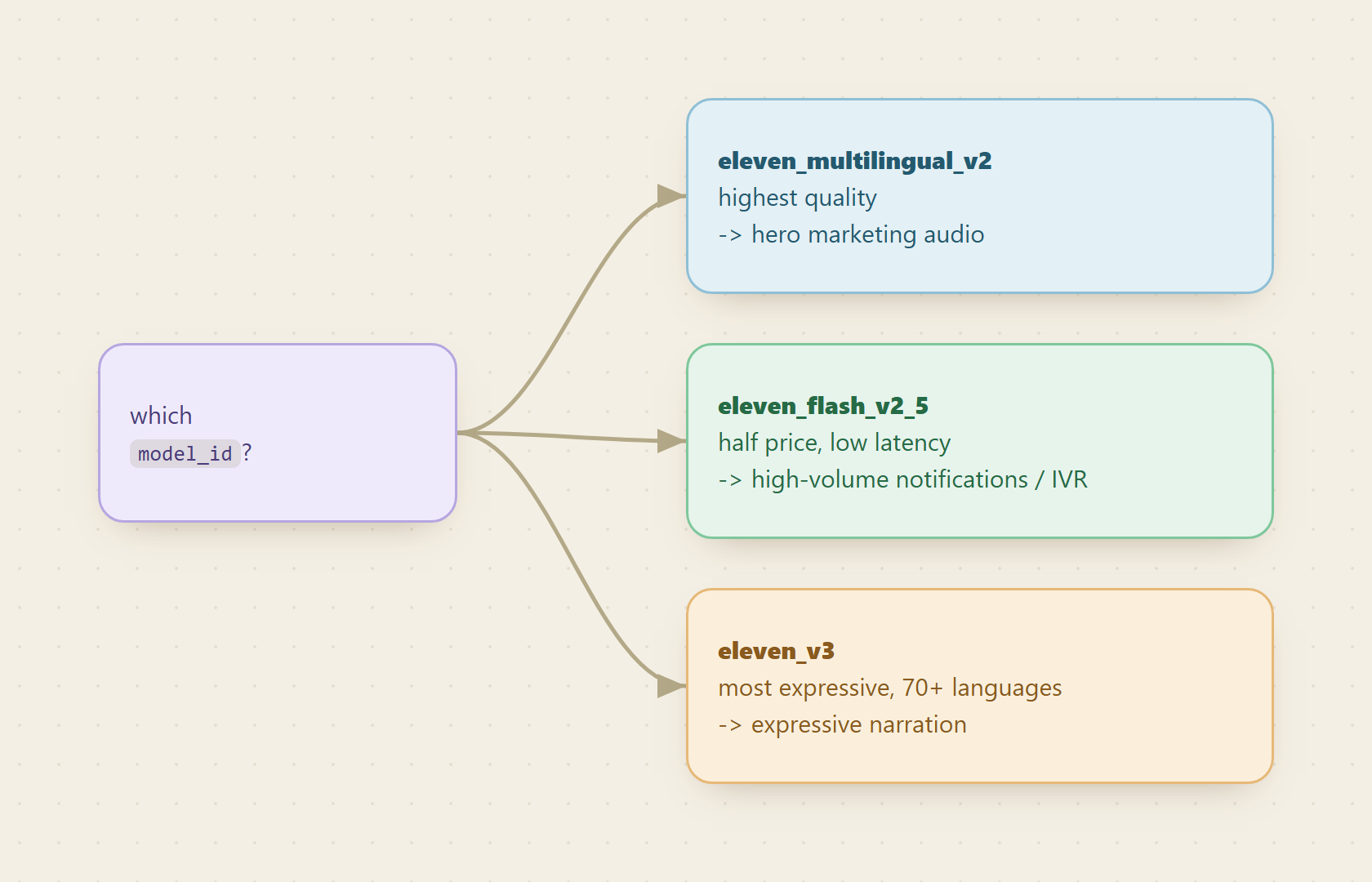
eleven_flash_v2_5for high-volume, low-latency notifications. It is half the price of the quality model and fast, which makes it the default for order updates, alerts, and IVR prompts you generate at scale.eleven_multilingual_v2for hero marketing audio. When a single asset needs to sound its best (a landing page, a launch video voiceover), pay for the top quality tier.eleven_v3for expressive, multi-language work. With 70+ languages and the most expressive delivery, it fits narration that has to carry emotion or reach a global audience.
Start every high-volume surface on flash, and reserve the quality and expressive tiers for the few assets where the difference is audible to your users.
Cost tally
Everything before the audio is free: discovering the provider, listing /voices, and inspecting /text-to-speech are all free. You pay only on Step 3, and only per character. A one-line order notification is a few dozen characters, so at cents per thousand characters it lands at a fraction of a cent per notification, and flash halves even that. A longer onboarding script (a few hundred characters) is still pennies. Cache aggressively and you pay once per unique line, not once per playback. For the exact live rate, check monid.ai/tools.
FAQ
How is the ElevenLabs text to speech API billed through Monid?
Per character on the text field, in the range of cents per thousand characters, charged only on a successful run. The flash model is half the price of the quality model. Listing voices and inspecting the endpoint are free.
What is the maximum text length per call? 5,000 characters. For anything longer, split it into multiple runs (for example one run per paragraph or per prompt) and stitch or sequence the resulting MP3s on your side.
How long does the download_link stay valid? It is a fresh signed URL returned with each run, so treat it as short-lived. Fetch the MP3 promptly and store it in your own bucket or CDN, then serve from there.
Which model should I default to?eleven_flash_v2_5 for high-volume, latency-sensitive audio like notifications and IVR, because it is half price and fast. Move to eleven_multilingual_v2 for hero marketing audio and eleven_v3 when you need expressive or multi-language delivery.
Try it
Pick a voice, write one line of product copy, and run a single text-to-speech call to hear it come back as an MP3. Cache the file, wire it into your order notifications or IVR, and you have a lifelike voice in your product without an audio pipeline. Start at monid.ai.