LinkedIn Job Data: Which API Actually Stays Fresh in 2026
Official LinkedIn has no open job feed and DIY scrapers go stale. Compare per-call LinkedIn job APIs on freshness, fields, and billing shape.

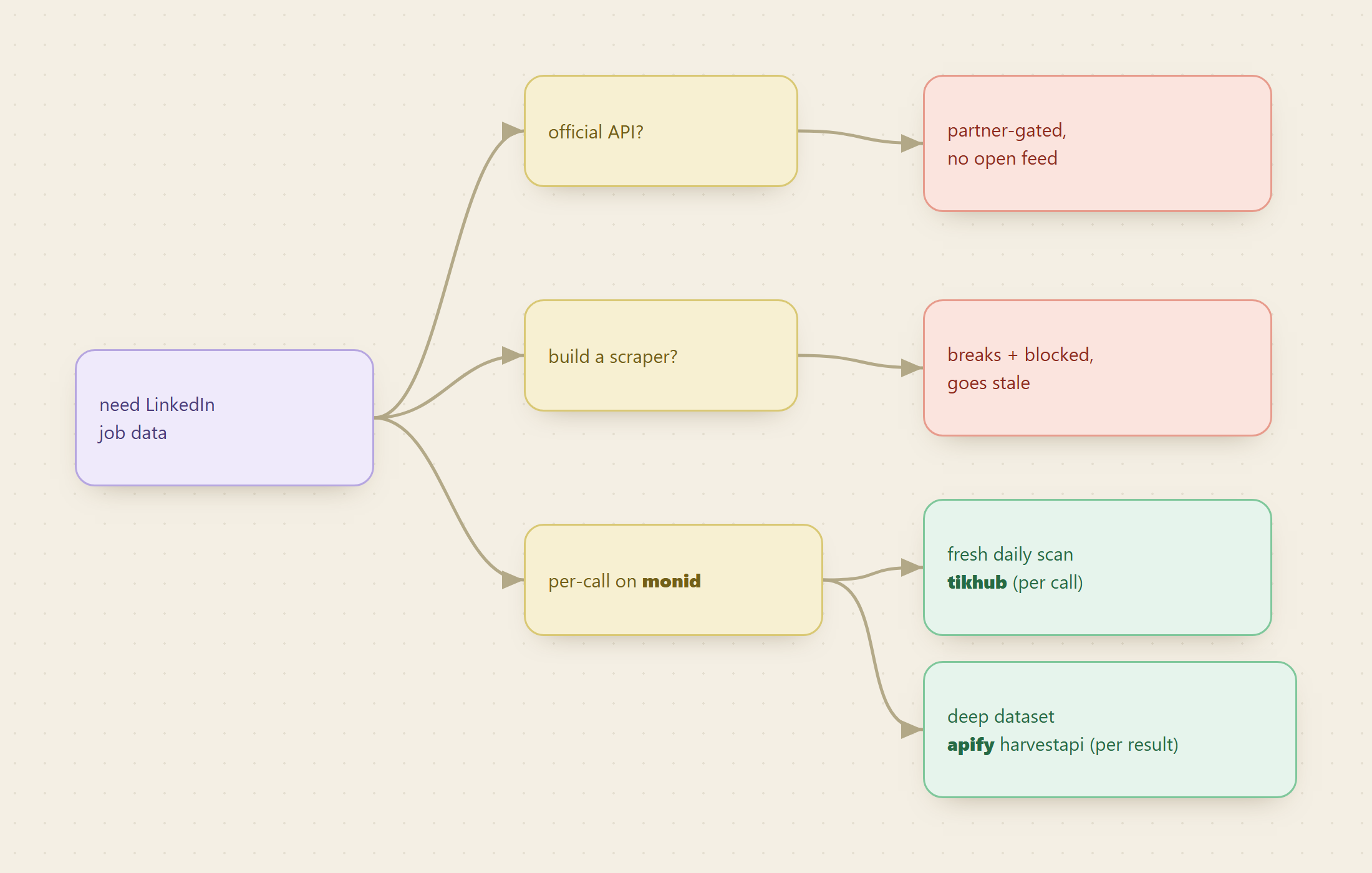
If you want LinkedIn job listings that are actually current in 2026, the official API is not an option and a DIY scraper will not stay fresh on its own. The official LinkedIn Jobs surface is partner-gated with no open job feed you can query, and a scraper you maintain yourself goes stale the moment LinkedIn changes a layout or blocks your IP. The route that stays fresh without a maintenance treadmill is a per-call job-search endpoint, and there are two good ones. Both reach you through Monid, the pay-per-call tool layer for AI agents where you discover, inspect, and run over a thousand tools from one interface without signing up per vendor.
TL;DR
- Official LinkedIn has no open job feed. The Jobs API is partner-gated for approved ATS and hiring products, so a general "search jobs" query is off the table for most builders.
- DIY scrapers break, not bounce. They go stale silently: a layout shift or an IP block returns empty or wrong results while you keep trusting the pipeline.
- TikHub
search_jobsis the freshest cheap scan. Per-call billing plus atime_rangefilter (Past 24 hours, week, month) makes it ideal for a recurring "what posted since yesterday" pull. - Apify
harvestapi/linkedin-job-searchis the deep dataset. Fresh uncached results, boolean queries, multi-location and multi-company, and applicant and view counts, billed per result. - Freshness is a filter, not a promise. The endpoint that lets you scope to a tight posting window wins over one that just says "current."
The comparison, up front
| Route | Freshness control | Fields you get | Billing shape |
|---|---|---|---|
| Official LinkedIn Jobs API | N/A, no open feed | N/A for general search | Partner contract, gated |
| DIY scraper | Whatever you code, breaks silently | Whatever survives the last layout change | Proxies, servers, your time |
TikHub search_jobs | time_range: 24h / week / month | Core listing plus company, location, type | Per call, flat |
Apify harvestapi/linkedin-job-search | Posting date range, fresh uncached | Full job + company, applicant and view counts, apply URL | Per result |
A free monid discover -q "linkedin jobs" returns these ranked with provider, description, current price, and a verified tag. A free monid inspect shows every field and filter before you spend a cent. Current per-endpoint prices are at monid.ai/tools.
📖 See also Job Postings API: Turning Hiring Into a Buying Signal
Why the official API is a dead end for job search
Start with what LinkedIn allows, because it explains everything downstream. LinkedIn's job-posting APIs exist for approved partners: applicant tracking systems and hiring tools that post jobs into LinkedIn, not general consumers who want to read the job market. There is no public "search all jobs matching data engineer in the US" endpoint you can sign up for. Access is a partnership review, and even then the surface is built around managing your own postings, not harvesting everyone else's.
So the moment your job is "see what roles are open across companies I do not control," the official surface is closed. That is not a workaround problem, it is by design, and it is why every recruiter tool, talent-market dashboard, and job aggregator ends up on scraped data. The honest question is not whether to scrape. It is who maintains the scraper and how you know it is still fresh.
Why DIY scrapers fail the freshness test specifically
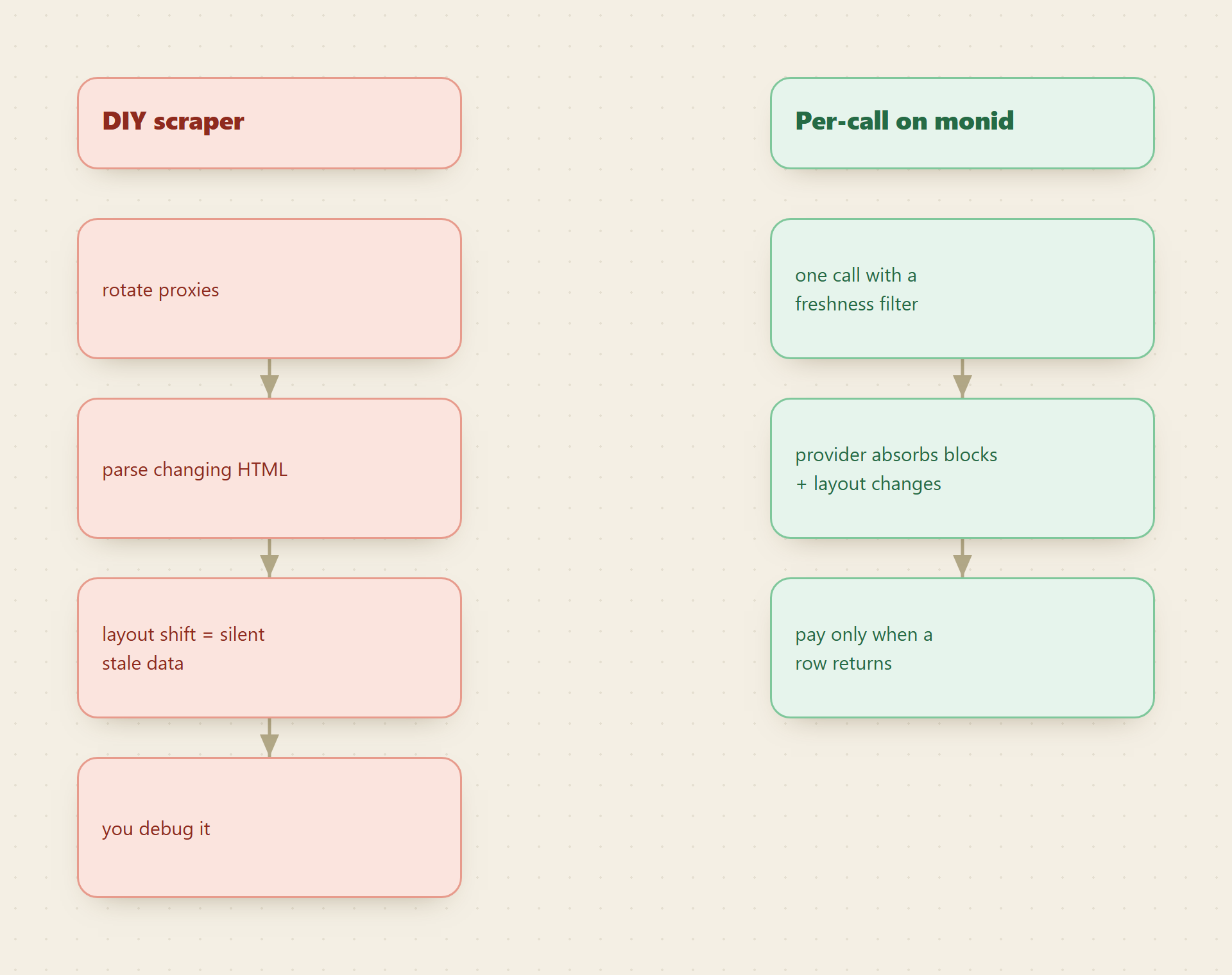
A hand-built LinkedIn job scraper can work for a week. The trouble is the failure mode: it does not throw a loud error, it quietly returns stale or empty results. LinkedIn rotates page structure, adds a login wall to a route, or blocks the datacenter IP your scraper runs on, and now your "daily job feed" is yesterday's cache or a page of nothing, and nobody notices until a hiring manager asks why the dashboard has no new roles.
To keep a DIY scraper genuinely fresh you are running residential proxies, rotating them, handling login and rate limits, parsing HTML that changes without notice, and babysitting all of it. That is real infrastructure and real hours, and none of it is your actual product. The per-call routes below externalize exactly that maintenance: the provider absorbs the layout changes and the blocking, and you pay only when a call returns.
TikHub search_jobs: the fresh, cheap daily scan
TikHub's /api/v1/linkedin/web_v2/search_jobs is the lean option, and its freshness story is the standout. Inspect it first and the shape is clear:
monid inspect -p tikhub -e /api/v1/linkedin/web_v2/search_jobs # free
The one required field is location. On top of that you get a keyword field, a country (a two-letter code like US), job_type (Full-time, Part-time, Contract, and so on), experience_level, remote (On-site, Remote, Hybrid), company, and the field that matters most here: time_range, which accepts Any time, Past month, Past week, or Past 24 hours.
That time_range filter is the whole freshness argument. You are not hoping the endpoint returns recent postings, you are telling it to return only jobs posted in the last 24 hours. For a routine that runs every morning and asks "what opened since yesterday," this is the right tool. It is a query-parameter endpoint, so you pass --query, and billing is per call: one flat charge whether the search returns three rows or thirty, a fraction of a cent per call.
For agents
Grab an API key at app.monid.ai, then paste this to your agent and hand it the key:
set up https://monid.ai/SKILL.md
It learns the whole discover, inspect, run workflow itself. More details in the agent quickstart.
For humans
npm install -g @monid-ai/cli
monid keys add --label main --key <your-api-key>
More details in the CLI quickstart.
Then the fresh daily pull, scoped to the last week:
monid run -p tikhub -e /api/v1/linkedin/web_v2/search_jobs \
  --query '{"keyword":"data engineer","location":"United States","time_range":"Past week"}' -w
Because billing is per call, cost is predictable regardless of how many roles match, which makes this the cheapest way to keep a recurring freshness scan running.
📖 See also the LinkedIn scraper API comparison
Apify harvestapi: the deep, still-fresh dataset
When you need more than a scan, harvestapi/linkedin-job-search on Apify is the depth play, and its summary is explicit that it returns fresh uncached results with no account or cookie required. The input is a JSON body built around jobTitles, an array of search queries that support boolean operators, so one run can chase several titles at once. You filter with locations and company (names or full company URLs), plus workplaceType, employmentType, experienceLevel, salary bands, applicant thresholds, easy-apply flags, and posting date ranges. maxItems caps how many jobs come back per title and location.
What lands is richer than the scan: full job text and HTML descriptions, posting timestamps, compensation and benefits when present, company profile metadata (name, logos, employee counts, industries), job statistics like applicant and view counts, and direct application URLs. That applicant-count field alone is something a naive scraper rarely captures cleanly, and it is what turns a list of jobs into a signal about which roles are hot.
The tradeoff is the billing shape. This endpoint is per result, so cost scales with rows returned, plus a tiny flat fee per query. The pricing note is worth heeding: pass a single query to keep cost predictable, because total results roughly equal the number of queries times your per-query limit. Inspect it and set maxItems deliberately:
monid inspect -p apify -e /harvestapi/linkedin-job-search   # free: see filters + price

monid run -p apify -e /harvestapi/linkedin-job-search \
  -i '{"jobTitles":["data engineer"],"locations":["United States"],
       "employmentType":["full-time"],"experienceLevel":["mid-senior"],
       "maxItems":25}' -w
Keep maxItems small while tuning filters, then open it up once the query is right. A few dozen fully-detailed postings land in single-digit dollars.
The decision heuristic
Pick by what the job in front of you actually needs, not by which endpoint is objectively bigger.
- Recurring freshness scan on a tight budget: TikHub
search_jobswithtime_rangeset to Past 24 hours or Past week. Flat per-call cost, and you control the freshness window directly. - Rich dataset for analysis or a talent-market dashboard: Apify
harvestapi/linkedin-job-search, which returns applicant counts, apply URLs, and full company metadata. Budget per result and capmaxItems. - You are an approved ATS or hiring product managing your own postings: the official partner API is genuinely the right home. It is only a dead end for general job search, not for posting management.
- You are tempted to build your own: only if job data is your core product and you will fund the proxy and maintenance work forever. Otherwise the freshness you want is a filter on a per-call endpoint, not a scraper you babysit.
Because Monid also ships as an MCP server, an agent handed "pull every data engineer role posted in the last day across these five metros" can route this itself: TikHub for the fast fresh scan, Apify when it needs the deep fields, all from one balance at app.monid.ai.
FAQ
Does LinkedIn have a public jobs API I can just call? No. The official job-posting APIs are partner-gated for approved hiring and ATS products and are built for managing your own postings. There is no open feed for general job search.
Which endpoint gives me the freshest results?
TikHub search_jobs gives you the most direct freshness control through its time_range filter (down to Past 24 hours). Apify harvestapi/linkedin-job-search returns fresh uncached results and supports posting date ranges when you also need deep fields.
Why not just build my own scraper? You can, but LinkedIn layout changes and IP blocks make DIY scrapers go stale silently, and keeping one fresh means running proxies and parsing shifting HTML indefinitely. Per-call endpoints move that maintenance to the provider.
How is this priced?
TikHub is per call, a flat charge no matter how many rows return. Apify is per result plus a small flat fee per query, so cap maxItems. A free monid inspect shows the price before anything bills, and current numbers are at monid.ai/tools.
Try it
Run a free monid discover -q "linkedin jobs", inspect whichever route fits your job, and pull a handful of listings you can eyeball for freshness. For a daily scan start with TikHub and its time_range filter; for a rich dataset start with the Apify job search. Everything begins at monid.ai.