MiniMax vs Suzanne for product imagery: picture or model?
MiniMax image generation gives flat 2D product shots cheaply; Suzanne text-to-3D gives a spinnable game-ready mesh. Pick by what you need.
Pick by whether you need a picture or a model. MiniMax image generation gives you a flat 2D product shot, one fixed camera, one fixed light, for a fraction of a cent per image. Suzanne text-to-3D gives you an actual mesh you can spin, relight, and drop into AR or a configurator, at a higher per-call cost. Neither is a better tool. They produce different artifacts, and the artifact you need decides the winner before price ever enters the conversation.
Copy this line to your agent to generate both a 2D shot and a 3D mesh of the same product and compare.
set up https://monid.ai/SKILL.md and generate the same product as a MiniMax image and a Suzanne 3D mesh, then compare cost and output
TL;DR
- MiniMax
/v1/image_generationreturns a rendered 2D image: one prompt, one camera, one lighting setup, baked in. Great for listing photos, ad creative, and hero shots. - Suzanne
/v1/generations/text-to-3dreturns a 3D mesh (GLB by default, OBJ or STL on request) with polygon count and PBR textures you control. You choose the camera and light later. - Cost shape differs: MiniMax bills per result (per image, and unsafe images are not charged), so a batch of angles is cheap. Suzanne bills per call (per mesh), so one model that yields infinite angles is where its price pays off.
- Choose MiniMax when the deliverable is a picture. Choose Suzanne when the deliverable is a thing that has to move, be relit, or be viewed from any angle.
- Both sit behind one Monid wallet, so you can run them against the same product without two vendor contracts. Magnitudes are on monid.ai/tools.
The one question that settles it
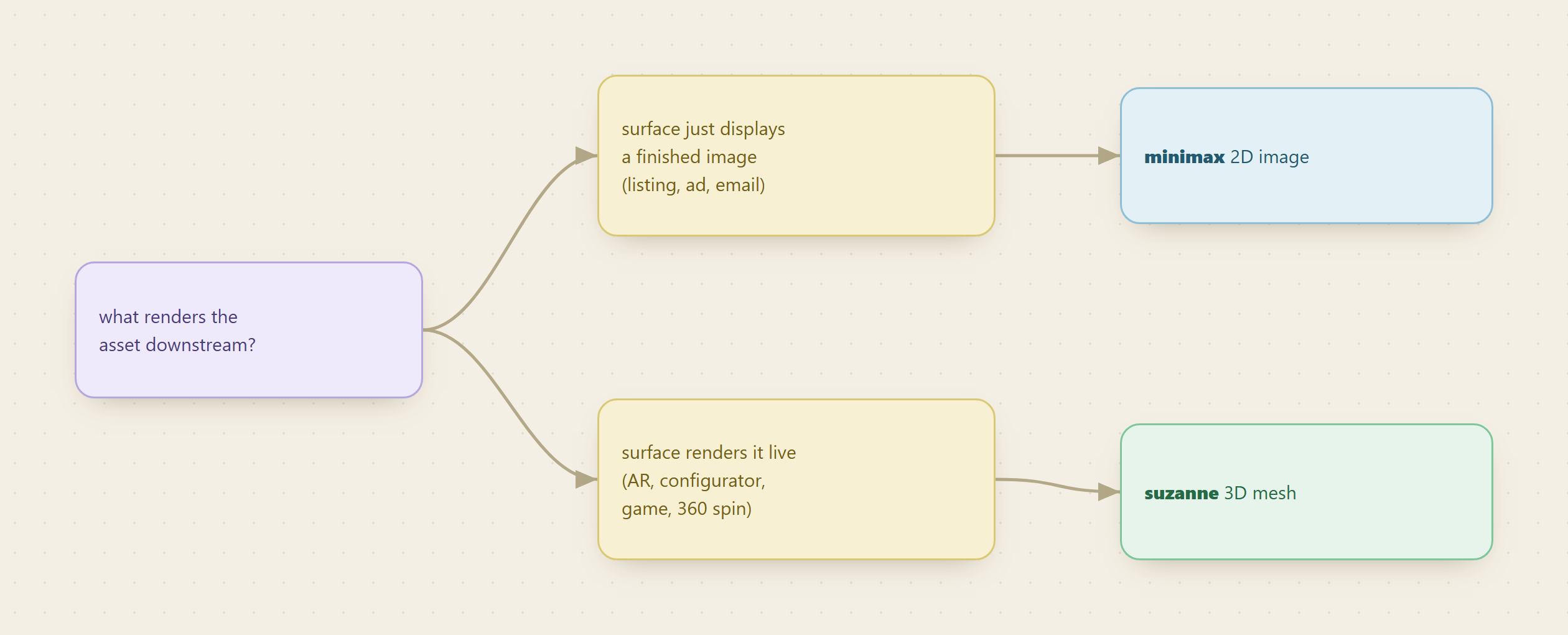
Before comparing quality or price, answer this: does the downstream surface render your asset, or just display it?
An Amazon listing, an Instagram ad, an email hero, a blog thumbnail: these display a finished picture. Nothing on the other end recomputes lighting or lets the viewer rotate the object. That is a 2D job, and paying for a 3D mesh you then flatten into one screenshot is waste.
A web configurator, an AR "view in your room" button, a game scene, a spinning 360 viewer on a product page: these render your asset live. The surface decides the camera and the light at view time, which means it needs geometry, not a photo. That is a 3D job, and no number of flat images will substitute, because you cannot rotate a picture you did not shoot.
A fair comparison
| MiniMax image generation | Suzanne text-to-3D | |
|---|---|---|
| Endpoint | /v1/image_generation | /v1/generations/text-to-3d |
| Output | Rendered 2D image (URL or base64) | 3D mesh: GLB default, OBJ or STL optional |
| What you control | Aspect ratio, size, count, seed, optional portrait reference | Polygon count (faces), PBR textures on or off, export formats |
| Camera and light | Baked into the image at generation | Chosen later, by whatever renders the mesh |
| Billing shape | Per result (per image) | Per call (per mesh) |
| Latency | Fast, synchronous | Async job, polled to completion |
| Best-fit deliverable | Listing photos, ad creative, hero and thumbnail images | AR, configurators, games, 360 viewers, physical prototyping |
The honest read is that these barely compete. MiniMax makes marketing visuals. Suzanne makes assets. The overlap is only the narrow case where you want a single product beauty shot and could get there either way, and in that case MiniMax wins on cost and speed every time, because you do not need geometry you are going to throw away.
What each one actually returns
MiniMax /v1/image_generation takes a prompt and an aspect_ratio (1:1 through 21:9), optionally exact width and height, and an n from 1 to 9 that drives how many images you get in one run. It returns a url (expiring in 24 hours) or inline base64. With image-01-live and a subject_reference portrait, it does image-to-image for character-consistent results. The fields that matter for product work are aspect_ratio (match the destination slot: 1:1 for a marketplace tile, 9:16 for a story), n (generate a spread of variations in one call), and seed (reproduce a shot you liked). See the MiniMax image generation reference.
Suzanne /v1/generations/text-to-3d runs asynchronously: the job is polled internally and completes with status and an outputs[] array of download URLs. The knobs that decide whether the mesh is usable are params.faces (40k, 100k, 500k, or 1.5M polygons, so a game prop and a hero render pull very different budgets) and params.pbr (base color, metallic-roughness, and normal maps, which is what makes the model react correctly to light). You request glb, obj, or stl in outputs, then fetch the bytes with the model download endpoint using the job's job_id. GLB for web and AR, OBJ for DCC tools, STL for print. Details on the Suzanne text-to-3D docs.
The cost tradeoff, in shapes not numbers
We do not print exact rates, because the honest unit here is cost per usable deliverable, and that depends on how many views you need. Live magnitudes are on monid.ai/tools. The reasoning that survives any price change:
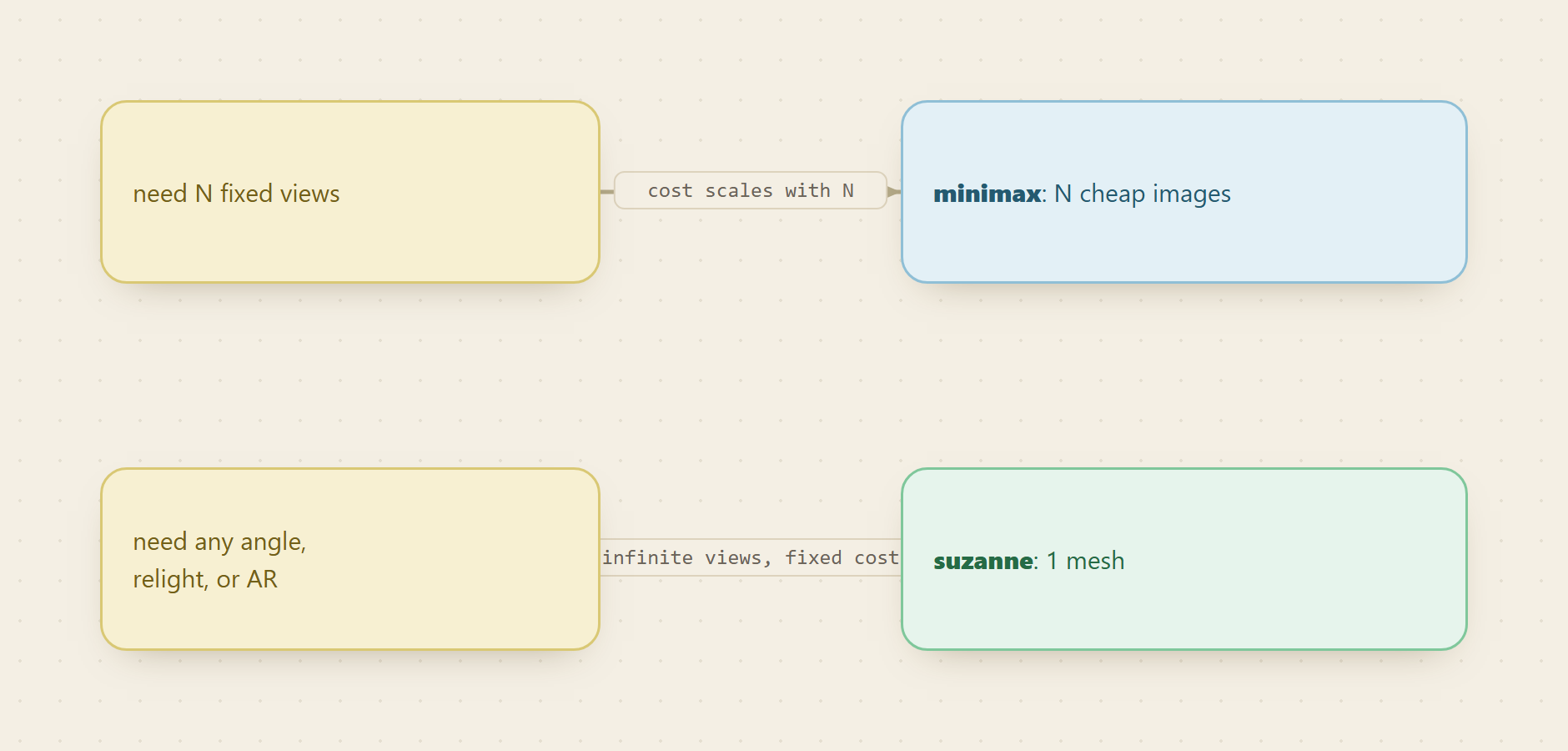
MiniMax bills per image, in the fraction-of-a-cent range, and does not charge for images blocked on content safety. So a full set of a product from six angles is six cheap results. If you need six pictures, six pictures is what you pay for, and if you later need a seventh angle, that is one more cheap call.
Suzanne bills per call, per mesh, at a magnitude of tens of cents. That looks expensive next to one MiniMax image, and it is, if all you needed was one image. But a single mesh yields unlimited angles for free after generation, because the rotation happens in the renderer, not in a new API call. The break-even is roughly the moment you need enough distinct views that stacking flat images costs more than one model, plus every view you cannot get from images at all: live relighting, a customer spinning the object, an AR placement.
The practical how-to
Run both on the same product before you commit a pipeline. Discover and inspect are free on Monid, so you only spend on the runs, and you see two outputs and two invoices side by side.
For agents
Grab an API key at app.monid.ai, then paste this to your agent and hand it the key:
set up https://monid.ai/SKILL.md
It learns the whole discover, inspect, run workflow itself. More details in the agent quickstart.
For humans
npm install -g @monid-ai/cli
monid keys add --label main --key <your-api-key>
More details in the CLI quickstart.
Inspect both schemas and prices for free, then generate the same product both ways:
monid inspect -p minimax -e /v1/image_generation
monid inspect -p suzanne -e /v1/generations/text-to-3d
monid run -p minimax -e /v1/image_generation -i '{"model":"image-01","prompt":"a matte black water bottle on a marble kitchen counter, soft daylight","aspect_ratio":"1:1"}' -w
monid run -p suzanne -e /v1/generations/text-to-3d -i '{"model":"sculptor","prompt":"a matte black water bottle, game-ready mesh"}' -w
The MiniMax call returns an image URL you can drop straight into a listing. The Suzanne call returns a job with a GLB download URL you load into a viewer, spin, and light. Look at both, then decide which artifact your surface actually consumes.
One honest caveat
A 3D mesh is not a finished render, and a MiniMax image is not editable geometry. Suzanne hands you a model, but someone or something still has to light it, pose it, and render or embed it; the mesh is the start of the visual, not the end. MiniMax hands you a pixel-perfect scene, but if you later decide you want that bottle from the back, you generate a new image and hope the material matches, because there is no object underneath to rotate. The mistake to avoid is buying a mesh for a job that only ever needed one flat picture, or trying to fake a configurator out of a pile of 2D shots. Match the artifact to the surface and both tools are cheap for what they do.
Monid is a pay-per-call data API marketplace that puts hundreds of external endpoints, including both of these generative routes, behind one interface and one wallet, so you can price a picture against a model on your own product instead of guessing.
FAQ
Should I use MiniMax or Suzanne for product images? Use MiniMax when the deliverable is a picture that will be displayed as-is: listing photos, ads, hero images. Use Suzanne when the deliverable is a model that has to be spun, relit, or placed in AR or a configurator. The downstream surface decides, not the price.
Can I get a 3D-looking image out of MiniMax? Yes, MiniMax can render a photorealistic product shot that reads as dimensional, but it is still a flat image with one baked camera and one baked light. You cannot rotate it or relight it. If the viewer needs to move around the object, you need Suzanne's mesh.
Which is cheaper? MiniMax bills per image in the fraction-of-a-cent range; Suzanne bills per mesh in the tens-of-cents range. For a handful of fixed shots, MiniMax is cheaper. Once you need many angles, live relighting, or AR, one Suzanne mesh beats stacking images. Magnitudes are on monid.ai/tools.
What file formats does Suzanne return?
GLB by default, with OBJ and STL available via the outputs field. GLB suits web and AR, OBJ suits 3D editing tools, and STL suits 3D printing. You control polygon count and PBR textures per job.
Do I need two accounts to try both? No. Both MiniMax and Suzanne are reachable from one Monid wallet, billed pay-as-you-go at the price shown before you run.