OCR API: Extract Text From an Image in One Call
Read text off a screenshot, receipt photo, or scanned PDF with one OCR API call. Route by input type to a vision-model OCR or a whole-file parser.
To pull text off an image or a scanned document with one API call, route by input type: send a screenshot, receipt photo, or handwritten note to a vision-model OCR that returns text plus a confidence signal, and send a multi-page scanned PDF or office file to a whole-file parser that returns clean Markdown with OCR turned on. Same key, same wallet, one command each. This post gives you the two commands and the rule for picking between them.
Monid is a pay-per-call data API marketplace that lets you reach hundreds of external data endpoints from one key and one wallet, paying only when a run succeeds. Both OCR routes below live on it, so you can test each on your own worst file before wiring anything up.
TL;DR
- Messy single image (screenshot, phone photo of a receipt, handwritten note): run Strale
/x402/image-to-text, an OCR API backed by a Claude vision model. It returns the text plus a confidence value you can gate on. - Whole scanned document (multi-page PDF, DOCX, PPTX): run Context.dev
/parsewithocr:true. It returns clean GitHub-flavored Markdown and only charges the OCR rate on pages that actually needed OCR. - The routing rule is the input, not the accuracy score. One image the eye can read at a glance goes to Strale. A full file you want as structured Markdown goes to Context.dev parse.
discoverandinspectare free. Onlyrunbills. Magnitudes: a few cents per image, a fraction of a cent per file. See monid.ai/tools.- Keep the confidence check and sample before batch: OCR accuracy drops on skewed, low-light captures.
Two shapes of OCR, and why one endpoint does not cover both
"OCR" hides two different jobs. The first is reading text off a single messy raster: a screenshot with UI chrome around it, a receipt shot at an angle, a note someone wrote by hand. There is no file structure to preserve, you just want the characters, and the hard part is tolerating skew, glare, and non-machine strokes. A vision-model OCR reads the picture holistically, the way you read a crumpled receipt without squinting at each glyph, and it hands back a confidence signal so you know which reads to trust.
The second job is a whole document: a 30-page contract that was scanned to PDF, a slide deck, a spreadsheet export. Here the structure is the point. You want headings, tables, and reading order turned into Markdown a model can chunk and embed, and OCR is only needed on the pages that are actually images rather than selectable text. Pointing the single-image endpoint at a 30-page PDF is the wrong shape, and running a full-document parser on one screenshot is overkill.
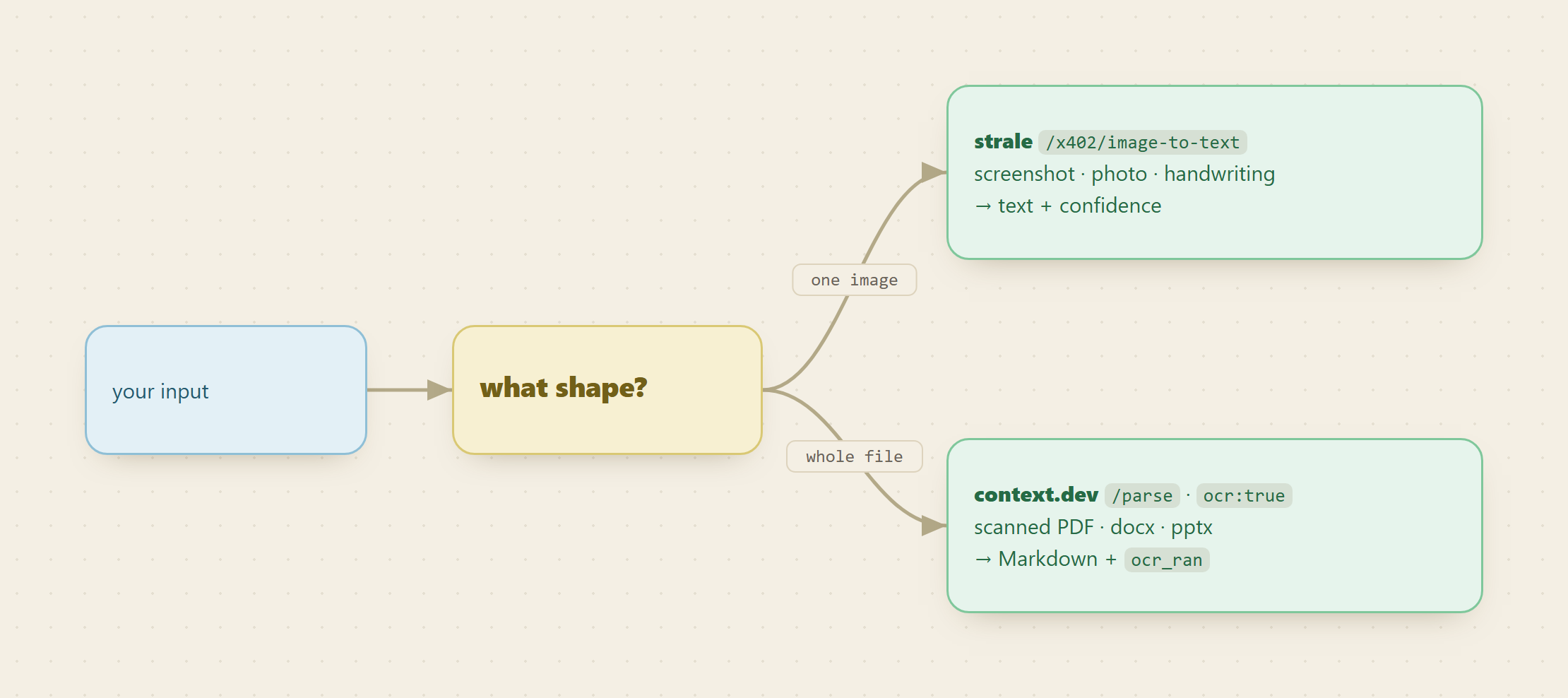
So the decision is mechanical:
- One image you could read at a glance (screenshot, document photo, handwriting) goes to Strale image-to-text.
- A whole scanned document you want back as Markdown goes to Context.dev parse with
ocr:true.
Set up once
For agents
Grab an API key at app.monid.ai, then paste this to your agent and hand it the key:
set up https://monid.ai/SKILL.md
It learns the whole discover, inspect, run workflow itself. More details in the agent quickstart.
For humans
npm install -g @monid-ai/cli
monid keys add --label main --key <your-api-key>
More details in the CLI quickstart.
STEP 1: read both schemas for free
Discovery and inspection never bill, so confirm the fields and the exact price before you spend anything. The image route takes query params, the parse route takes a JSON body, and inspect is where you see which is which.
monid discover -q "ocr image to text"
monid inspect -p api.strale.io -e /x402/image-to-text
monid inspect -p context.dev -e /parse
Strale /x402/image-to-text is a GET that reads any image, either image_url or an inline base64 string, and returns text with a confidence value. Context.dev /parse is a POST that takes file_url (a public https link up to 25MB), plus ocr, useMainContentOnly, and includeImages. It returns Markdown and an ocr_ran flag telling you whether OCR actually fired.
STEP 2: read a messy image
Point Strale at a public URL of the single image you want read. Here it is a receipt photo. The -w flag waits inline and prints the result.
# a screenshot, photo, or handwritten note -> text + confidence (Strale, Claude vision OCR)
monid run -p api.strale.io -e /x402/image-to-text \
  --query '{"image_url":"https://example.com/receipt.jpg"}' -w
You get the extracted text plus a confidence value. Swap image_url for your own worst input: a whiteboard photo, a handwritten form, a screenshot with a table wedged between toolbars. If the image is not web-hosted, pass it inline as base64 instead of image_url. The confidence value is the field that earns its keep: wire a threshold so high-confidence reads flow straight through and low-confidence captures route to a human or a second pass instead of getting silently trusted.
STEP 3: parse a whole scanned document
For a multi-page scanned PDF, send the file URL to Context.dev with ocr:true so it reads the embedded page images, not just any selectable text layer.
# a scanned multi-page PDF -> clean Markdown, OCR the embedded page images
monid run -p context.dev -e /parse \
  -i '{"file_url":"https://example.com/contract-scan.pdf","ocr":true}' -w
Back comes GitHub-flavored Markdown for the whole file with headings and tables preserved, plus the ocr_ran flag. That flag is also a billing signal: parse only charges the OCR rate on pages that genuinely needed it, so a PDF that is half real text and half scanned images does not pay the OCR premium on every page. The Markdown keeps its heading hierarchy, which means you can chunk on ## and ### and feed the pieces straight to an embedder.
STEP 4: gate, then batch
Do not batch on faith. OCR accuracy falls on skewed and low-light photos, so run a handful of your real captures first and eyeball the confidence values from Strale and the ocr_ran output from parse. Once you know the threshold your inputs cross reliably, loop the rest, sending low-confidence images to review rather than downstream.
What it costs, in magnitudes
We do not print rates, because the number that matters is cost per usable extraction and that depends on your input mix. The shape of the bill:
| Route | When to use | Billing shape | Magnitude |
|---|---|---|---|
| Strale image-to-text | One messy image, screenshot, or handwriting | Per call | A few cents per image |
| Context.dev parse | A whole scanned file to Markdown | Tiered, OCR rate only on pages that needed it | A fraction of a cent per file, a bit more when OCR runs |
A quick tally for a realistic day: read 40 receipt photos through Strale (a few cents each, so single-digit dollars) and parse a dozen scanned contracts through Context.dev (a fraction of a cent each, plus the OCR uplift only on the scanned pages, so still under a dollar). No per-vendor signup, no monthly floor, and the price shows on the free inspect step before you run. Current magnitudes for both endpoints are on monid.ai/tools.
Why not just self-host Tesseract
The reflex is to install Tesseract and pay nothing. It is genuinely excellent on clean, flat, printed pages, and if you control capture you should use it. The cost shows up on the messy slice. Tesseract wants deskewed, denoised, thresholded input, so you own a preprocessing pipeline before a single character is read. It reconstructs tables poorly, so layout is lost on exactly the scanned documents you most wanted structured. And it does not read handwriting in any practical way. "Free per image" is not free per correct read once you count the tuning, the retries, and the manual fixes. The two hosted routes absorb the preprocessing, the layout reconstruction, and the handwriting case, and bill only when a run succeeds.
FAQ
Which OCR API should I use for a screenshot versus a scanned PDF?
A single screenshot, receipt photo, or handwritten note goes to Strale /x402/image-to-text, a vision-model OCR that returns text plus a confidence value. A whole scanned PDF or office file you want as clean Markdown goes to Context.dev /parse with ocr:true. Route by input type, not by an accuracy benchmark.
How do I flag a bad OCR read before it reaches my pipeline? Strale returns a confidence value with the text. Set a threshold: high-confidence reads pass through, low-confidence captures route to human review or a second pass. Because OCR accuracy drops on skewed and low-light photos, sample a handful of real inputs and confirm the threshold before you batch.
Do I pay the OCR rate on every page of a parsed document?
No. Context.dev parse charges the OCR rate only on pages that actually needed OCR, and the ocr_ran flag in the response tells you whether it fired. A file that is part real text and part scanned images does not pay the OCR premium on the text pages.
How much does OCR through Monid cost? Pay-as-you-go at the price shown on the free inspect step before you run, from one wallet shared with hundreds of other endpoints. Expect a few cents of magnitude per image on the vision route and a fraction of a cent per file on the parse route. Current rates are on monid.ai/tools.