Ship a LinkedIn Job-Alert Bot With One Metered API Call
Build a LinkedIn job-alert bot that scrapes fresh postings, de-dupes by id, and pings Slack daily. One metered call, a fraction of a cent per result. No cookie.

A working LinkedIn job-alert bot is one saved search, one metered scrape, and a five-line diff that surfaces only postings you have not seen before.
Paste this to your coding agent and it will wire up the whole job-alert bot end to end, from the search query to the daily Slack ping.
set up https://monid.ai/SKILL.md and use apify/harvestapi/linkedin-job-search to build a LinkedIn job-alert bot
Monid is the OpenRouter for agent tools: one integration and one balance reach over a thousand tools, discovery and inspection are free, and you only pay when you actually run a job.
TL;DR
- The paid step is a single call to
apifyendpoint/harvestapi/linkedin-job-search, which returns full LinkedIn postings (title, description, company profile, applicant stats, direct apply URL) with no LinkedIn account or cookie and no cache. - Billing is per result: a fraction of a cent per job plus a tiny flat fee. Pass one focused query so cost stays predictable. Check the live number at monid.ai/tools.
- The scraper runs once per query in
jobTitles, so a single query at a bounded limit is one predictable batch, not a runaway crawl. - The bot is five steps: inspect (free), run one bounded query, reduce with
jq, diff against a seen-ids file, then cron it to Slack or email. - Only new postings ever reach you, because every run compares fresh ids against the ones you already alerted.
Set up Monid once
For agents
Grab an API key at app.monid.ai, then paste this to your agent and hand it the key:
set up https://monid.ai/SKILL.md
It learns the whole discover, inspect, run workflow itself. More details in the agent quickstart.
For humans
npm install -g @monid-ai/cli
monid keys add --label main --key <your-api-key>
More details in the CLI quickstart.

📖 See also reading hiring as a buying signal
Step 1: Inspect the endpoint (free)
Before you spend anything, read the schema. Inspection is free, so you can confirm the input fields and the output shape without a single billed result.
monid inspect -p apify -e /harvestapi/linkedin-job-search
You will see the body fields you can send: jobTitles (an array of search-query strings that accept boolean operators), locations (an array, use full names like "United Kingdom" rather than "UK"), plus optional filters for workplaceType (remote, hybrid, on-site), employmentType, experienceLevel, a salary range, a posting-date window, an easyApply flag, an applicant-count threshold, and a per-query result cap. On the output side each job carries the full title and description (text and HTML), the posting timestamp, compensation and benefits, workplace and employment attributes, company profile metadata (name, logo, employee count, industry), job stats (applicant and view counts), and the direct application URL.
Step 2: Run one bounded query (the only paid step)
This is the single call that costs money. Send exactly one query in jobTitles, one or two locations, and a firm result cap so the batch size (and therefore the bill) is known before you press enter.
monid run -p apify -e /harvestapi/linkedin-job-search \
  -i '{"jobTitles":["senior data engineer"],"locations":["United States"],"workplaceType":["remote"],"limit":50}' \
  -w -o jobs.json
The -i flag passes the JSON body, -w waits for the async scrape to finish, and -o jobs.json writes the raw results to disk. Keep the JSON minimal: limit is the per-query result cap, so 50 means at most fifty jobs for this one query. Because the scraper runs once per query in jobTitles, one query keeps the cost to a single predictable batch.
Step 3: Reduce each job to the fields you care about
The raw payload is rich, but an alert only needs a handful of fields. Use jq to collapse each job down to a compact record.
jq '[.[] | {
  id: .id,
  title: .title,
  company: .companyName,
  location: .location,
  url: .applyUrl,
  postedAt: .postedAt
}]' jobs.json > matches.json
Now matches.json is a tidy array of {id, title, company, location, url, postedAt} objects, ready to compare and ready to render into a message.
Step 4: Diff against a seen-ids file so you only surface new postings
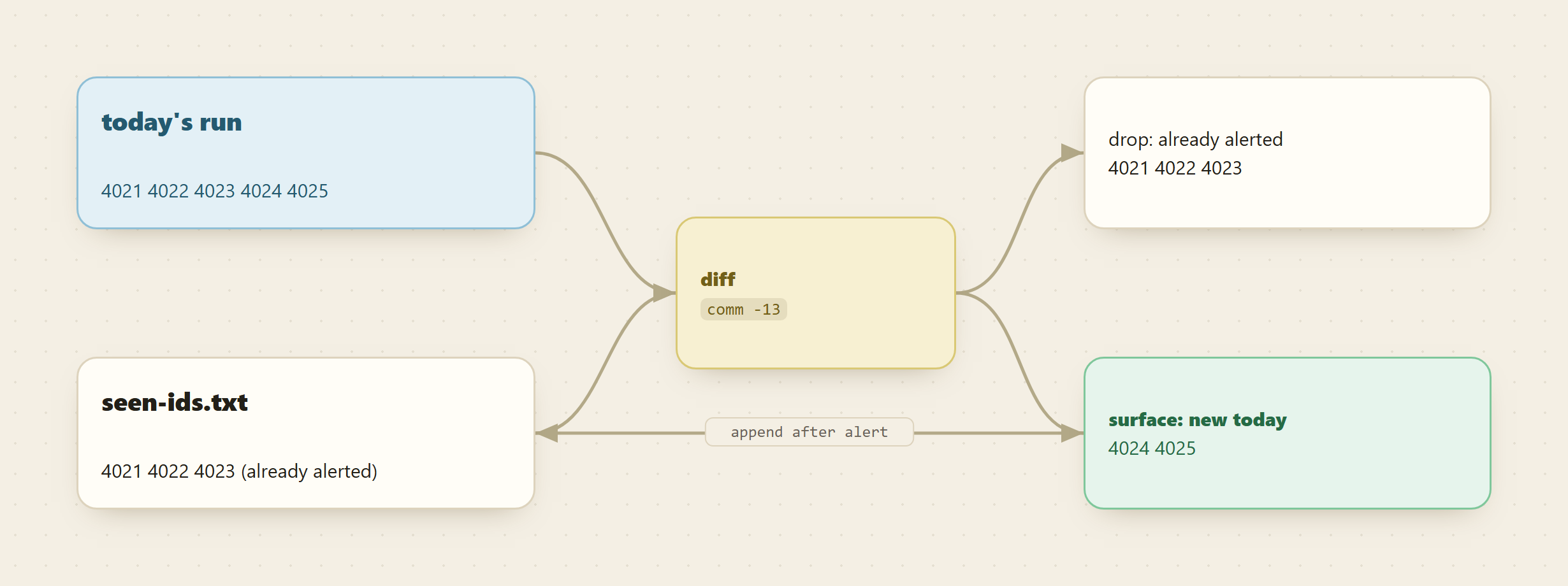
An alert bot that re-sends the same fifty jobs every morning is noise. Keep a running list of ids you have already alerted, and each run emit only the ids that are new.
# ids returned this run
jq -r '.[].id' matches.json | sort -u > today-ids.txt

# ids you have never alerted before
comm -13 seen-ids.txt today-ids.txt > new-ids.txt

# the full records for just the new ids
jq --slurpfile ids <(jq -R -s 'split("\n") | map(select(length>0))' new-ids.txt) \
   '[.[] | select(.id as $i | $ids[0] | index($i))]' matches.json > new-jobs.json

# remember what you alerted, so tomorrow it stays quiet
cat seen-ids.txt today-ids.txt | sort -u > seen-ids.tmp && mv seen-ids.tmp seen-ids.txt
On the first run seen-ids.txt is empty (create it with touch seen-ids.txt), so everything is new. On every run after that, new-jobs.json holds only postings you have never seen.
📖 See also which LinkedIn scraper API to use
Step 5: Wire it into a daily cron that posts to Slack
Wrap the four steps in a script and schedule it. A single daily run is a single metered call, and only the new matches leave the machine.
#!/usr/bin/env bash
set -euo pipefail
cd "$HOME/linkedin-alert-bot"

monid run -p apify -e /harvestapi/linkedin-job-search \
  -i '{"jobTitles":["senior data engineer"],"locations":["United States"],"workplaceType":["remote"],"limit":50}' \
  -w -o jobs.json

# ... Step 3 and Step 4 reduction and diff here ...

if [ -s new-ids.txt ]; then
  jq -r '.[] | "*\(.title)* at \(.company) (\(.location))\n\(.url)"' new-jobs.json \
    | while read -r line; do
        curl -s -X POST -H 'Content-type: application/json' \
          --data "{\"text\": $(jq -Rs . <<< "$line")}" \
          "$SLACK_WEBHOOK_URL" > /dev/null
      done
fi
Add it to crontab for a 9am daily run:
0 9 * * * /home/you/linkedin-alert-bot/run.sh >> /home/you/linkedin-alert-bot/log.txt 2>&1
Swap the curl block for a sendmail or email API call if you prefer inbox alerts over Slack.
Cost tally
Add up the whole bot and only one line has a price on it.
- Inspect (Step 1): free.
- Run (Step 2): one call, billed per result. At a
limitof 50 that is at most fifty results, each a fraction of a cent, plus a tiny flat fee. A daily 9am cron is roughly thirty of these calls a month. - Reduce, diff, and alert (Steps 3 to 5): free, all local
jq,comm, andcurl.
So the running cost of the bot is one small metered scrape per day, and you pay for results, not for uptime or a monthly seat. The live per-result number is on monid.ai/tools.
FAQ
Do I need a LinkedIn account or cookie to run this?
No. The /harvestapi/linkedin-job-search endpoint returns fresh, uncached postings without any LinkedIn login, session, or cookie. You send a query and get structured jobs back.
How do I keep the cost predictable?
Send a single query in jobTitles and set a firm result cap. The scraper runs once per query, so total results are roughly the number of queries times the per-query limit. One query at limit 50 is one bounded batch, and you can watch the exact per-result figure at monid.ai/tools.
Why diff against a seen-ids file instead of just re-sending everything?
Because a good alert is only the delta. The scrape returns the current matching set every run, so without the seen-ids.txt comparison you would re-alert the same jobs daily. The diff in Step 4 guarantees each posting reaches you exactly once.
Can I widen the search to several titles or locations later?
Yes, but remember the billing math: each extra query in jobTitles is another metered run, and each extra location can multiply results. Start with one query, confirm the cost and quality, then add scope deliberately.
Try it
You can stand up this bot in an afternoon: inspect for free, run one bounded query, and let the diff keep your alerts clean. Every morning you get only the LinkedIn postings you have not seen, for the price of a few results a day. Start at monid.ai.