Ship an Instagram Profile Enricher This Afternoon
Turn a list of Instagram usernames into a structured CSV of name, bio, followers, verified, and external URL with one Monid script over Apify.

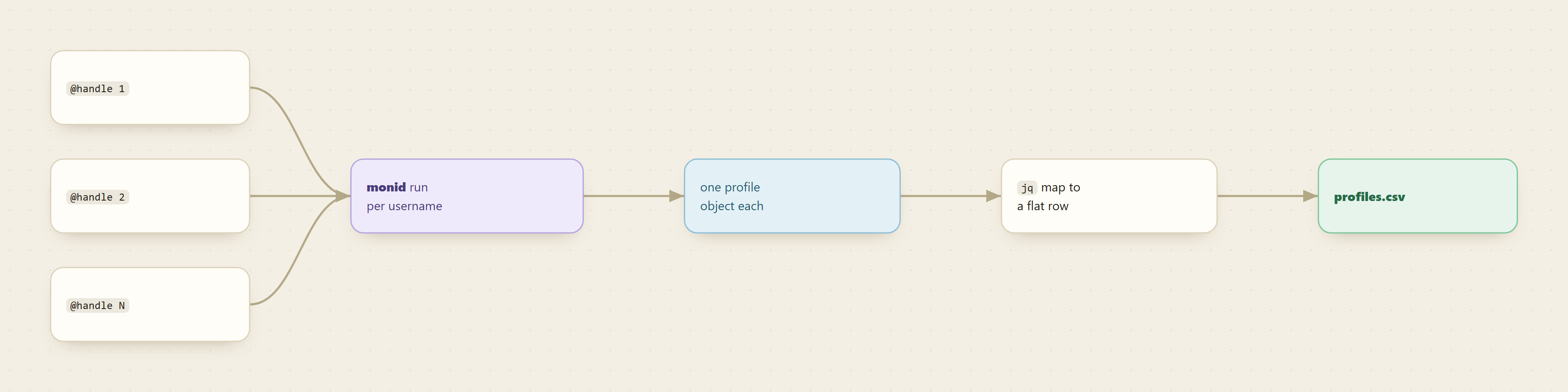
Give a list of Instagram usernames one endpoint and you get back one clean row per handle: full name, bio, follower count, verified flag, and external URL, ready to write to CSV. No Graph API app review, no per-vendor signup, and the whole build fits in an afternoon.
This is the cookbook version. You have a list of handles sitting in a spreadsheet, maybe from a signup form, a partnerships shortlist, or a creator outreach sheet, and you want each one enriched into a structured record. The tool is the Apify instagram-profile-scraper, reached through Monid so you never touch an Apify account.
Monid is a pay-per-call data-API marketplace: one interface and one balance to discover, inspect, and run over a thousand tools without a separate account for each provider. You read a schema for free, then pay only for the run that returns rows.
TL;DR
- One endpoint,
apify/apify/instagram-profile-scraper, takes ausernamesarray and returns one profile object per handle with name, bio, followers, verified, and external URL. - Inspect the schema for free, run one username to confirm the fields, then loop your whole list.
jqmaps each result to a flat record;@csvhandles the quoting so bios with commas do not break your columns.- Billing is per result, so enriching a list of a few hundred handles is a few-dollars job. See monid.ai/tools for live pricing.
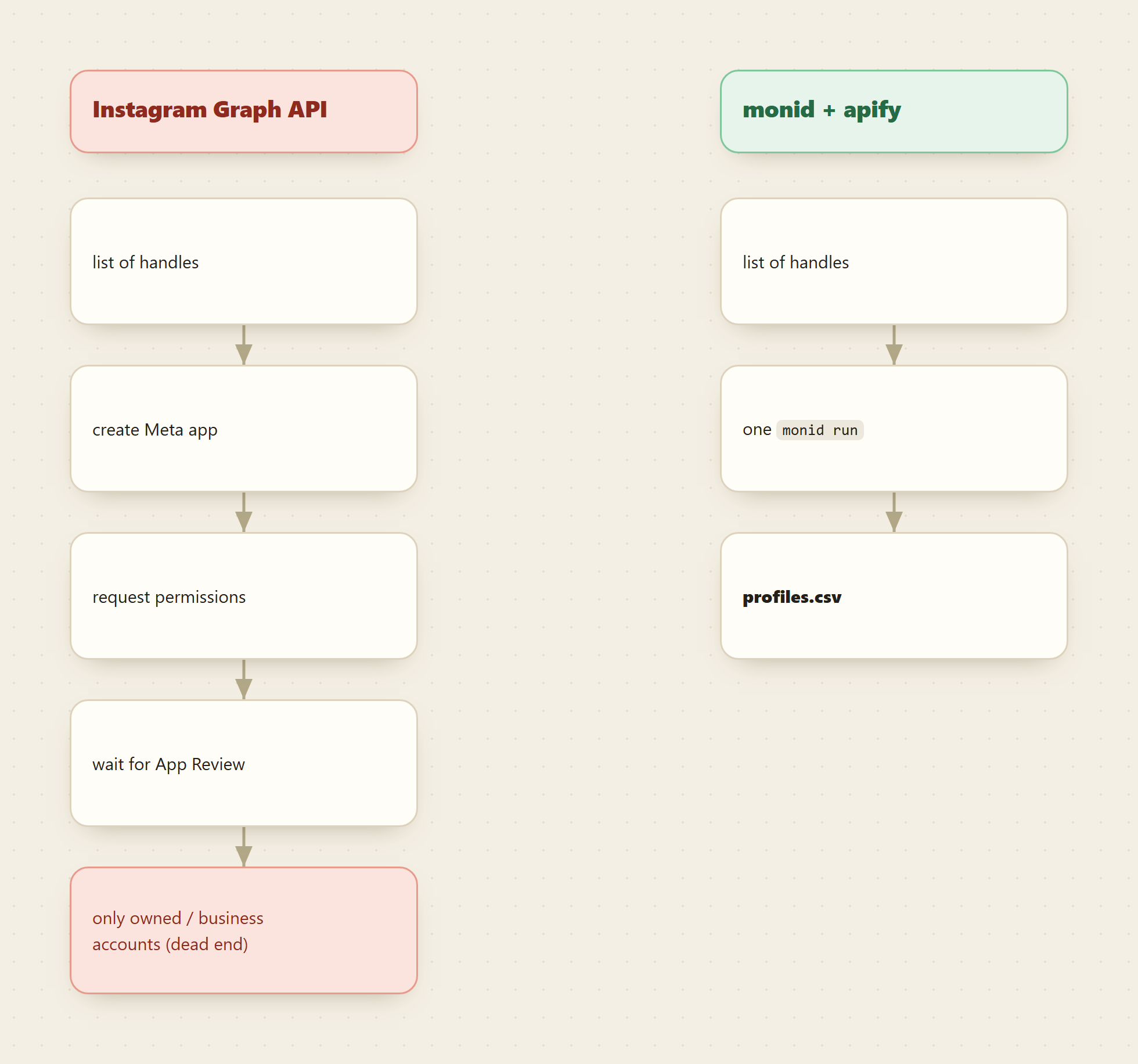
- The Instagram Graph API is not the shortcut here: it only reads accounts you own or manage, and it needs app review first.
Set up Monid once
For agents
Grab an API key at app.monid.ai, then paste this to your agent and hand it the key:
set up https://monid.ai/SKILL.md
It learns the whole discover, inspect, run workflow itself. More details in the agent quickstart.
For humans
npm install -g @monid-ai/cli
monid keys add --label main --key <your-api-key>
More details in the CLI quickstart.
📖 See also which API returns Instagram engagement data
Step 1: inspect the endpoint (free)
Read the schema before you spend anything. Inspect shows the accepted input fields and the price per result, and it costs nothing.
monid inspect -p apify -e /apify/instagram-profile-scraper
The input body takes usernames, an array of handles, as the required field. There is an optional includeAboutSection flag that pulls the account's "about this account" panel (country, join date, former usernames), billed as a paid extra, so leave it off unless you need it. The output returns one object per username with username, fullName, biography, followersCount, followsCount, verified, private, and externalUrl, among others. Those key names are the contract the rest of the script leans on, so note the exact spelling here rather than guessing later.
Step 2: run one username first
Prove the shape with a single handle before you loop anything. The -i flag carries the JSON body and -w waits inline so the result comes straight back.
monid run -p apify -e /apify/instagram-profile-scraper \
  -i '{"usernames":["humansofny"]}' \
  -w -o humansofny.json
If the run goes async you get a run ID instead of the result. Poll and save it with:
monid runs get -r <RunID> -o humansofny.json
Now humansofny.json holds one profile object. Open it and check that the field names match what Step 1 promised. This one call is the entire billable action in the whole recipe.
Step 3: map the five fields you actually want
The result object carries more than you need. Pull the five enrichment columns into a flat record so you can see them land:
jq '{
  handle: .username,
  name: .fullName,
  bio: .biography,
  followers: .followersCount,
  verified: .verified,
  external_url: .externalUrl
}' humansofny.json
If a field comes back null, that usually means the account left it blank (plenty of profiles have no external URL), not that the pull failed. verified is a real boolean straight from Instagram, so you can filter your enriched list on it without a second lookup. If any key name here does not resolve, the inspect output from Step 1 is your source of truth, not this snippet.
Step 4: loop your username list
One handle proves the shape. Your real input is a list. Put the handles in a plain text file, one per line, and run each on its own so a private or misspelled account fails alone instead of taking the batch down.
# handles.txt: one username per line
while read -r h; do
  monid run -p apify -e /apify/instagram-profile-scraper \
    -i "{\"usernames\":[\"$h\"]}" \
    -w -o "raw_$h.json"
done < handles.txt
Each handle writes its own raw_<handle>.json. You could pass the whole list inside a single usernames array in one call, and that is fine for a small trusted list, but per-handle files keep failures isolated and make re-running a single bad row trivial. Keep your test list to a handful of handles until the CSV columns are exactly right.
Step 5: write it all to CSV
Emit the header once, then append one flattened row per profile across every file.
echo "handle,name,bio,followers,verified,external_url" > profiles.csv

for f in raw_*.json; do
  jq -r '[
    .username, .fullName, .biography,
    .followersCount, .verified, .externalUrl
  ] | @csv' "$f" >> profiles.csv
done
@csv quotes and escapes every field, so a bio full of commas, quotes, or emoji will not shift your columns. Open profiles.csv in any spreadsheet and you have a finished enrichment table: sort by followers, filter to verified only, or drop the rows with no external URL. That is the deliverable.
📖 See also which Apify Instagram actor to use
Why not the Instagram Graph API
The reflex is to reach for Meta's official Instagram Platform APIs. For this task they are the wrong tool, and it is worth knowing why before you sink an afternoon into app configuration.
The Graph API reads accounts you own or that a business explicitly grants you access to through a connected Facebook Page. You cannot hand it an arbitrary list of public usernames and get profiles back. There is a Business Discovery feature, but it only surfaces business and creator accounts, not personal ones, and you still need a reviewed app plus a token tied to an account you control. Getting there means creating a Meta app, requesting permissions, and passing App Review before a single call works. For enriching a cold list of handles you did not create, that path does not lead anywhere.
The Apify actor reads the same public profile pages a logged-out visitor sees, so a list of public usernames is exactly the input it expects. Monid is the layer that lets you call it without an Apify account or a stored token.
Cost tally
Everything before the run was free. Discover and inspect cost nothing, so you shape the whole pipeline and confirm the field names without touching your balance. Billing kicks in only at monid run, and it is per result: one row returned, one unit billed. That means a test of a few handles lands in the single-digit-cents range, and enriching a full list of a few hundred usernames stays in the low few-dollars range. Turning on includeAboutSection adds a per-result surcharge, so leave it off unless you need the country or join-date panel. Check current per-result pricing on monid.ai/tools before you widen the list.
FAQ
What exactly counts as one billable result?
One profile returned for one username. A list of 200 handles that all resolve bills as roughly 200 results. Inspect is always free, so reading the schema and testing your jq costs nothing.
Can I pull posts too, not just the profile? This endpoint is profile-level enrichment, one row per handle. If you want recent posts and their engagement, that is a different Apify actor for post-level data, reachable through the same Monid interface without a new signup.
What happens to a private or nonexistent handle? That single run returns an empty or error result while the rest of your loop keeps going. That is the reason Step 4 writes one file per handle instead of batching the whole list into one call.
How current is the data?
The actor reads the live public profile at run time, so followersCount and verified reflect the account as it stands when you call it. Re-run the list on a schedule if you want the enrichment to stay fresh.
Is the Instagram Graph API ever the right choice? Yes, for reading insights on accounts you own or manage: your own audience metrics, media performance, and inbox. For enriching a list of handles you do not control, it cannot help, which is the whole reason this recipe uses Apify through Monid instead.