Wire Up ICP Prospect Search with People Data Labs
Define an ideal customer profile, search matching people, and pull a page of prospects into a table with People Data Labs on Monid, pay-per-record.
Copy this line to your agent to turn an ideal customer profile into a page of real prospects.
set up https://monid.ai/SKILL.md and use People Data Labs /v5/person/search to find people matching a role, country, industry, and company size
You can turn a written ideal customer profile into a table of real prospects in one script, and pay only for the records you pull. Describe the person you want (a sales role, in the United States, at a software company of a certain size), send that as a query to a people-search endpoint, and get back names, titles, companies, locations, and LinkedIn URLs. This is prospect search, not enrichment: you start from a description, not a known identifier, and you page through matches until you have enough. Here is the whole cookbook, step by step.
TL;DR
- An ICP is four filters: role, country, industry, and company size. On Monid those map cleanly onto People Data Labs person fields.
- Call People Data Labs
/v5/person/searchwith an Elasticsearch-styleboolquery and a smallsize, and get back a page of matching people. - This endpoint bills per record retrieved, not per call, so
sizeis your cost dial. Keep it small (tens of cents per matched record, live numbers at monid.ai/tools). - Page with
scroll_token: run, read the token, feed it back, repeat until you have enough or you hit your ceiling. - The fields worth keeping are the plain ones: full name, title, company, location, LinkedIn URL.
Search is not enrichment
Worth saying up front, because it decides which endpoint you call. Enrichment starts from an identifier you already hold (an email, a phone, a LinkedIn URL) and returns the one person behind it. Prospect search starts from a description and returns candidates who fit. If you have a list of known contacts and want to fill in their profiles, that is enrichment, covered in an email in, a full person profile out. If you have a target market and no names yet, that is search, and that is this post.
Monid is the OpenRouter for agent tools: one key and one balance reach over a thousand tools across people and company data, scraping, social, and search, with the price shown before anything runs. Discovering the catalog and reading a schema is free. Only executing a call bills the wallet.
📖 See also People Data Labs, Apollo, ZoomInfo: Which Should You Actually Buy?
Set up once
For agents
Grab an API key at app.monid.ai, then paste this to your agent and hand it the key:
set up https://monid.ai/SKILL.md
It learns the whole discover, inspect, run workflow itself. More details in the agent quickstart.
For humans
npm install -g @monid-ai/cli
monid keys add --label main --key <your-api-key>
More details in the CLI quickstart.
Step 1: write the ICP as four filters
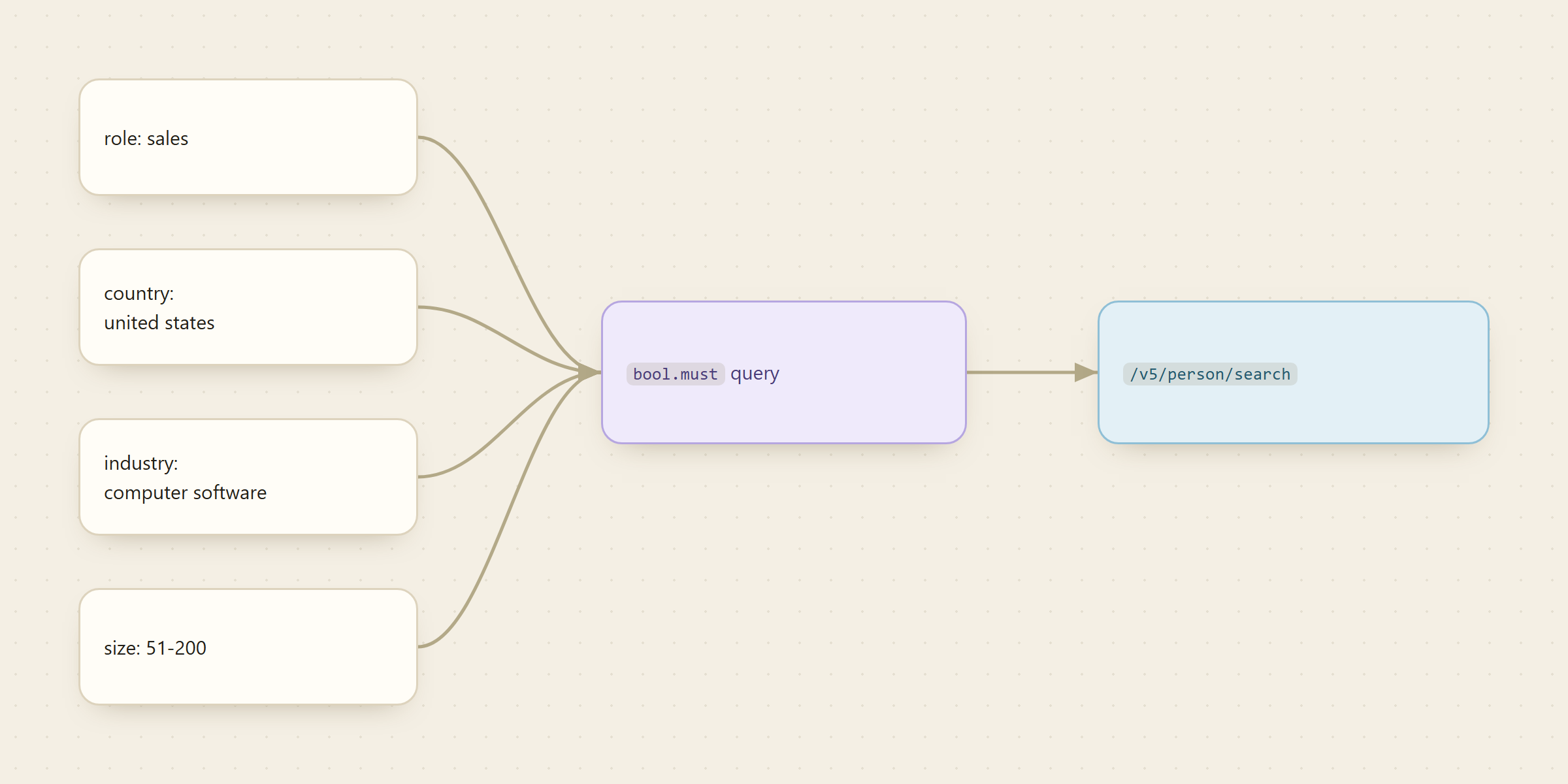
Start in plain language, then break it into fields. Say the target is "sales leaders at mid-size software companies in the US." That is four independent filters, and each one is a term on a specific PDL person field:
- Role maps to
job_title_role(values likesales,engineering,marketing). - Country maps to
location_country(lowercase,united states). - Industry maps to
industry(computer software). - Company size maps to
job_company_size(buckets like51-200,201-500).
The exact field names matter, and they are not always obvious. Run a free inspect before you commit money to confirm the schema, the values each field accepts, and the per-record price:
monid inspect -p pdl -e /v5/person/search
# -> input schema, PDL field reference, and the per-record price (free)
Step 2: build the bool query
PDL takes an Elasticsearch-style query object (or raw sql, pick one, not both). For an AND across all four filters, you put each term inside bool.must. The size (1 to 100) is how many records the call returns, and since you pay per record, start at 10 while you tune:
monid run -p pdl -e /v5/person/search \
  -i '{"query":{"bool":{"must":[
        {"term":{"job_title_role":"sales"}},
        {"term":{"location_country":"united states"}},
        {"term":{"industry":"computer software"}}
      ]}},"size":10}' -w
# -> up to `size` matching people, plus a scroll_token for the next page
Add or drop a term to tighten or loosen the profile. Want only mid-size companies? Add {"term":{"job_company_size":"51-200"}} to the must array. Want to widen a filter, say two roles? Swap that one term for a should block. The query is just JSON, so your agent can assemble it from the ICP fields without any client library. The full field list and query grammar are in the PDL person search docs.
Step 3: keep the fields that matter
A person record from PDL is large. For a prospect table you do not need most of it. Five fields carry the weight:
full_name: who they are.job_title: their exact title, which decides the message.job_company_name: where they work, for routing and account grouping.location_name: city and region, which sets timezone and territory.linkedin_url: the one link that lets a human verify the match in five seconds.
Project just those into a table and you have a working prospect list. Everything else (skills, education, employment history) is there if you want it, but the five above are what turns a JSON blob into rows a rep can act on.
📖 See also Apollo Scraper: Export Apollo.io Leads Safely by API
Step 4: page with scroll_token
One call gives you one page. To pull the next slice of the same result set, take the scroll_token from the response and feed it back into an otherwise identical call:
monid run -p pdl -e /v5/person/search \
  -i '{"query":{"bool":{"must":[
        {"term":{"job_title_role":"sales"}},
        {"term":{"location_country":"united states"}},
        {"term":{"industry":"computer software"}}
      ]}},"size":10,"scroll_token":"<token-from-last-response>"}' -w
The loop is simple: run, read the scroll_token, run again with it, stop when you have enough prospects or you hit the ceiling you set for yourself. Because each page costs per record, the ceiling is not just a data decision, it is your budget line.

What a run actually costs
Person search bills per record, not per call, which is the one number to internalize before you scale. Pulling a page of 10 lands in the low single-digit dollars territory (tens of cents per matched record), and a monid inspect shows the exact per-record price before you run anything. Live numbers are at monid.ai/tools.
The practical discipline that follows: tune the query at size: 10 until the sample looks right, and only then raise size or page deeper. A sloppy query at size: 100 pays full price for records you will throw away. A tight query at size: 10, checked by eye, tells you the profile is correct before you spend on volume. And in a week where you prospect nobody, you pay nothing, because there is no seat quietly renewing behind you.
FAQ
How is this different from enrichment? Enrichment starts from an identifier you already have (email, phone, LinkedIn URL) and returns the one matching person. Search starts from a description (role, country, industry, size) and returns candidates who fit. Different endpoints, different billing: enrich is per call, search is per record.
Why does size affect cost?/v5/person/search charges per record retrieved, so size is both how many people you get and how much you pay. Keep it at 10 while tuning the query, then raise it once the sample looks right. Prices are at monid.ai/tools.
How do I get past the first page?
Read the scroll_token from each response and pass it back into the next identical call. Repeat until you have enough prospects or the token stops advancing.
Can I query with SQL instead?
Yes. The endpoint accepts either an Elasticsearch query object or a raw sql string, one or the other. The bool/term form shown here maps most directly onto ICP filters, but SQL is there if you prefer it.
Try it on your own ICP
Take the profile you actually sell to, break it into role, country, industry, and size, and run a size: 10 search. Read the ten rows by hand, check a couple of LinkedIn URLs, and if they fit, page it out. It costs pocket change to find out, over at monid.ai.