How to Track TikTok Trends on a Schedule With Monid
Track TikTok trends by watching a keyword, sorting rising videos by likes from the last week, deduping against what you have seen, and re-running on a schedule.

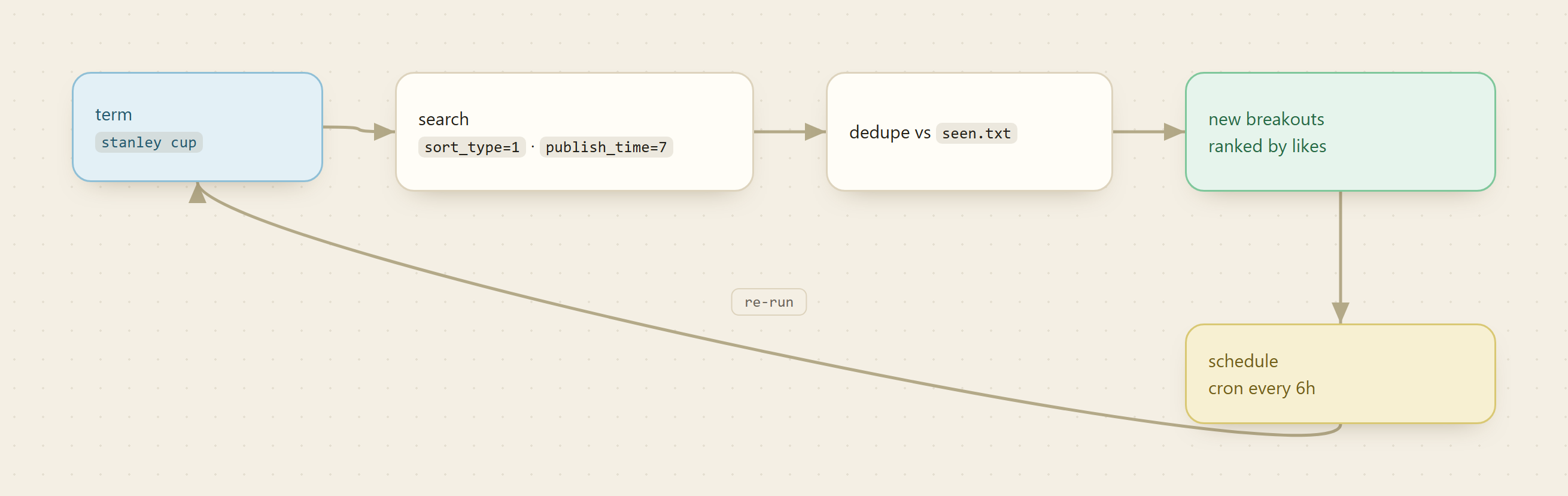
To track TikTok trends before they peak, run a keyword search sorted by most likes and filtered to the last week, then diff the results against what you have already logged. That one query shape, sort_type=1 plus publish_time=7, is what turns a flat keyword search into a "what is breaking out right now" feed, and a scheduled re-run is what surfaces a rising sound or product early instead of after everyone else already posted about it.
Monid is the OpenRouter for agent tools: one key and one balance reach over a thousand tools, and you pay only when a run succeeds. The TikTok search endpoint you need is already in the catalog, so this build is a query, a seen-set, and a schedule line. The provider here is TikHub, and every video pull is billed per call at a fraction of a cent.
TL;DR
- Endpoint:
tikhub/api/v1/tiktok/app/v3/fetch_video_search_result, which returns ranked videos for a search term. - Pin two query params to get a breakout feed:
sort_type=1(most likes) andpublish_time=7(last week). Addcount,offset, andregionto control depth and market. - Keep a set of video ids you have already seen. Each run, diff the fresh ids against that set and keep only the new high-like videos.
monid inspectis free. Onlymonid runbills, per call, so cost is the number of pulls you take, not the number of videos returned. Live rate on monid.ai/tools.- Wrap the pull, the diff, and the append in a script, then hand it to cron or Task Scheduler on the cadence you want.
What makes a search into a breakout feed
A raw keyword search on TikTok returns whatever the platform thinks is most relevant, which skews toward big evergreen accounts and last year's viral clips. That is the wrong signal for trend tracking. Two query params fix it.
sort_type controls ordering: 0 is relatedness (the noisy default), 1 is most likes. publish_time bounds recency: 0 is unlimited, 1 is the last day, 7 the last week, 30 the last month, and 90 or 180 for wider windows. Set sort_type=1 and publish_time=7 together and you are asking a precise question: which recently posted videos for this term already pulled the most engagement? A clip that racked up heavy likes in the past seven days is, by definition, something breaking out now. That pairing is the whole trick, and the rest of this recipe is plumbing around it.
📖 See also the social media scraping API comparison
Set up Monid once
For agents
Grab an API key at app.monid.ai, then paste this to your agent and hand it the key:
set up https://monid.ai/SKILL.md
It learns the whole discover, inspect, run workflow itself. More details in the agent quickstart.
For humans
npm install -g @monid-ai/cli
monid keys add --label main --key <your-api-key>
More details in the CLI quickstart.
Step 1: Read the schema before you spend
Inspect is free and shows the accepted query params, their defaults, the output shape, and the current price. Read it once so you know the exact field where video ids live before you start diffing.
monid inspect -p tikhub -e /api/v1/tiktok/app/v3/fetch_video_search_result
Confirm three things from the output: keyword is the only required field, ordering and recency are the sort_type and publish_time query params, and pricing is per call rather than per video. Note the path to the results array and the id field, because the dedupe step in Step 4 keys off exactly those.
Step 2: Pull the top videos for a term
This is the only step that bills. Because these are query parameters, pass them with --query. The -w flag waits inline so the finished result comes straight back.
# top videos for a term, sorted by most likes, from the last week
monid run -p tikhub -e /api/v1/tiktok/app/v3/fetch_video_search_result \
  --query '{"keyword":"stanley cup","sort_type":1,"publish_time":7,"count":20,"region":"US"}' -w
That returns the current breakout candidates for "stanley cup" in the US market. To capture the payload for the diff step, redirect stdout to a file, for example append > latest.json to the command.
Step 3: Page deeper or widen the window
Twenty results is the top of the list. If a term moves fast and you want more coverage, page with offset. If a term is quiet and the last week returns thin, widen to publish_time=30 for a monthly view.
# page deeper with offset, or widen the window with publish_time
monid run -p tikhub -e /api/v1/tiktok/app/v3/fetch_video_search_result \
  --query '{"keyword":"stanley cup","sort_type":1,"publish_time":30,"count":20,"offset":20,"region":"US"}' -w
Keep sort_type=1 fixed across both calls. The moment you loosen the sort or the window, you stop asking "what is breaking out" and start asking "what is broadly popular," which is a different and much noisier question.
Step 4: Dedupe against what you have already seen
A single pull is a leaderboard. The value is in the delta between pulls. Keep one file of video ids you have already logged, and each run reduces to a set difference. Pull the ids from the latest payload (use the id path you confirmed in Step 1), then compare.
# extract video ids from the latest pull
jq -r '.aweme_list[]?.aweme_id' latest.json | sort -u > ids-now.txt

# new ids are the ones not already in seen.txt
comm -13 seen.txt ids-now.txt > new-ids.txt

# fold the new ids into the seen set for the next run
cat new-ids.txt >> seen.txt && sort -u seen.txt -o seen.txt
If your inspect output showed the array under a different key or the id under a different field, change those two references and the logic holds. comm -13 prints only lines present in the fresh pull and absent from seen.txt, so new-ids.txt is exactly the breakouts you have not seen before.
Step 5: Keep the new breakouts with their numbers
Ids alone are not actionable. Join the new ids back to the payload so each alert carries the like count and the caption, then you can sort the batch and push only the strongest.
jq --rawfile ids new-ids.txt '
  ($ids | split("\n") | map(select(length > 0))) as $new
  | [ .aweme_list[]?
      | select(.aweme_id as $id | $new | index($id))
      | { id: .aweme_id,
          likes: .statistics.digg_count,
          desc: .desc } ]
  | sort_by(-.likes)
' latest.json > breakouts.json
That leaves breakouts.json holding only new videos for the term, ranked by likes. Route it wherever you want: a Slack webhook, a daily digest, or an append to a running log so you can look back at what surfaced each day.
Step 6: Run it on a schedule
Wrap Steps 2 through 5 in one script that takes a term as its argument, and hand it to cron or Windows Task Scheduler. A daily run catches most product and sound trends early; a term you care about a lot can run every few hours.
0 */6 * * * /path/to/track-term.sh "stanley cup"
To watch several terms, add a line per term, each with its own seen.txt. Because billing is per call, the cost of the whole tracker is just terms multiplied by pages multiplied by runs per day, which stays easy to predict as you add more.
📖 See also the Apify alternatives breakdown
The honest limit
This reads TikTok's public search ranking, not a private trends API. It reflects what the platform surfaces for a term, which is powerful for early signal but is not a sanctioned trends dataset. A few things to keep honest:
- A broad term is noisy. Pin
sort_typeandpublish_timetightly, and prefer specific terms (a product name, a sound title) over generic ones (a single common word). regionmatters. A trend breaking in the US may not show for another market, so run the same term across the regions you serve rather than assuming one covers all.- If you need TikTok's officially sanctioned trend data, that route is the TikTok Research API, which is approval-gated and limited to eligible researchers. This recipe is the pragmatic alternative when you want a standing tracker today without that gate.
Cost tally
monid inspect: free, so schema reading and field confirmation cost nothing.- One video pull: per call, a fraction of a cent, regardless of how many videos come back.
- One term, four runs a day: single-digit calls daily, cents for the month.
- Ten terms, every six hours, two pages each: still lands in single-digit dollars for a full month of standing coverage.
Per-call billing is why a scheduled tracker stays cheap: widening to more terms or a tighter cadence scales linearly and predictably. These magnitudes are a starting point, not a quote. Check the live rate on monid.ai/tools before you widen.
FAQ
How do I track TikTok trends without the official Research API?
Run a keyword search through Monid on the TikHub endpoint with sort_type=1 and publish_time=7, dedupe the video ids against a seen-set, and re-run on a schedule. That gives you an early breakout feed for any term without the approval gate on the TikTok Research API.
Why sort by most likes and filter to the last week? Because a video that gathered heavy likes in the past seven days is, by definition, something rising now. Relatedness sorting and unlimited recency surface evergreen popularity instead, which is the wrong signal for spotting what is breaking out.
How is this billed on Monid?
Inspect is free. Only monid run bills, and it is charged per call, so one pull of the top videos for a term is one flat charge no matter how many videos return. Live pricing is on monid.ai/tools.
Can an agent run the whole loop by itself? Yes. Monid ships as an MCP server, so an agent handed "track TikTok breakouts for stanley cup every six hours" can inspect the schema, run the search, and dedupe the results on its own. Point it at monid.ai/SKILL.md.