Any URL to LLM-Ready Markdown: A Copy-Paste Cookbook
Turn any URL, or a batch of twenty, into clean markdown you can chunk and embed, in one call. Plus the file formats a web scraper cannot read.
Copy this line to your agent to turn a reading list into markdown you can embed.
set up https://monid.ai/SKILL.md and use octen /extract to turn a list of URLs into clean markdown
Turning a page into markdown a model can read is one call, and turning a folder of mixed file types into the same thing is a second one. This is the cookbook for both: one URL, then twenty in a batch, then the query-focused mode that cuts tokens before they reach your embedder, then the file path for everything a web scraper cannot open. Monid is the OpenRouter for agent tools, so both endpoints below sit on one key, and both were verified with monid inspect on 2026-08-17.
Why not just fetch the HTML yourself?
Because fetching is the easy half. curl returns HTML in one line. What you do with it is where the work has always been, and the honest version of this section has to concede that the DIY answer got genuinely better this year.
The parse is the part that never finishes
A page is not a document. It is a document wrapped in navigation, cookie banners, related-article rails, comment widgets and inline scripts. An embedder given that raw returns vectors that match on boilerplate, so your retrieval starts surfacing the footer. Stripping it is a per-site job, and every site changes.
Then there is rendering. A growing share of pages assemble their body in JavaScript, so a plain fetch returns a shell with an empty div where the article should be. Now you are running a headless browser, which means you are running a browser pool, which means you have a service to keep alive.
The open-model counter-argument, which is real
There is a serious version of do-it-yourself now, and pretending otherwise would be dishonest. A thread on r/LocalLLaMA reporting small open models built specifically for HTML extraction, at a claimed fraction of a frontier model's cost, drew sixty-two comments, and that approach is real: the extraction quality of a purpose-trained small model on this narrow task is not the gap it used to be. We have not benchmarked their numbers and are not repeating them as fact.
What that path still owns is the fetch layer, the render layer, the proxy layer and the retry layer. The model replaces the parse step, which was one of five, and it is the step that had already become the least of the problem. That is the trade to weigh: a hosted extractor is renting all five, and a local model is buying the cheapest one back.
📖 See also Which MCP Server Gives an AI Agent Live Web Data?
📖 See also the free options for extracting page content for RAG, and where free stops being cheaper.
Is there a free API to extract page content for RAG applications?
Not free, but the parts that let you evaluate it are, and one billing detail makes the arithmetic much better than it looks.
Discovery and schema reading cost nothing. discover searches the catalogue and inspect returns the input schema and the price. Neither bills, so working out whether an endpoint fits is free by design and you never guess at cost.
Failed URLs are free. This is the detail worth building around. octen/extract bills per successfully extracted URL, and any URL that comes back with status: "failed" and an error_message is not charged. A dead link, a hard paywall or a timeout inside a batch of twenty costs nothing, which means you can throw an unvetted crawl frontier at it and pay only for the pages that produced text.
The real free tier is your own cache. max_age_seconds defaults to a day, so a repeated request for a stable page serves from cache. Set it high for documentation and reference pages, low for anything that changes hourly. Re-extracting an unchanged page at full price is the most common waste in an ingestion pipeline and it is one parameter away from being solved.
Current magnitudes are at monid.ai/tools.
What are the best practices for ingesting lots of mixed document types for LLM extraction?
Split by source type, not by document, and use the endpoint built for each. Mixed corpora go wrong when one loop tries to handle a web page, a scanned PDF and a spreadsheet with the same call.
For agents
Grab an API key at app.monid.ai, then paste this to your agent and hand it the key:
set up https://monid.ai/SKILL.md
It learns the whole discover, inspect, run workflow itself. More in the agent quickstart.
For humans
npm install -g @monid-ai/cli
monid keys add -k <your-key> -l main
Step 1. Web pages, one call for up to twenty
What it does. Takes a URL list and returns clean markdown per page, in input order.
The call.
monid run -p octen -e /extract -i '{
  "urls":[
    "https://www.paulgraham.com/greatwork.html",
    "https://www.paulgraham.com/ds.html"
  ]
}' -w
What comes back. Markdown per URL with detected page structure, plus optional image, video and audio resource lists. Failures arrive as records with status: "failed", so a partial batch is legible rather than silently short.
What it costs. Per successfully extracted URL, with a hard cap of twenty URLs per request. Chunk your list in twenties and the arithmetic stays trivial.
Step 2. Cut tokens before the embedder, not after
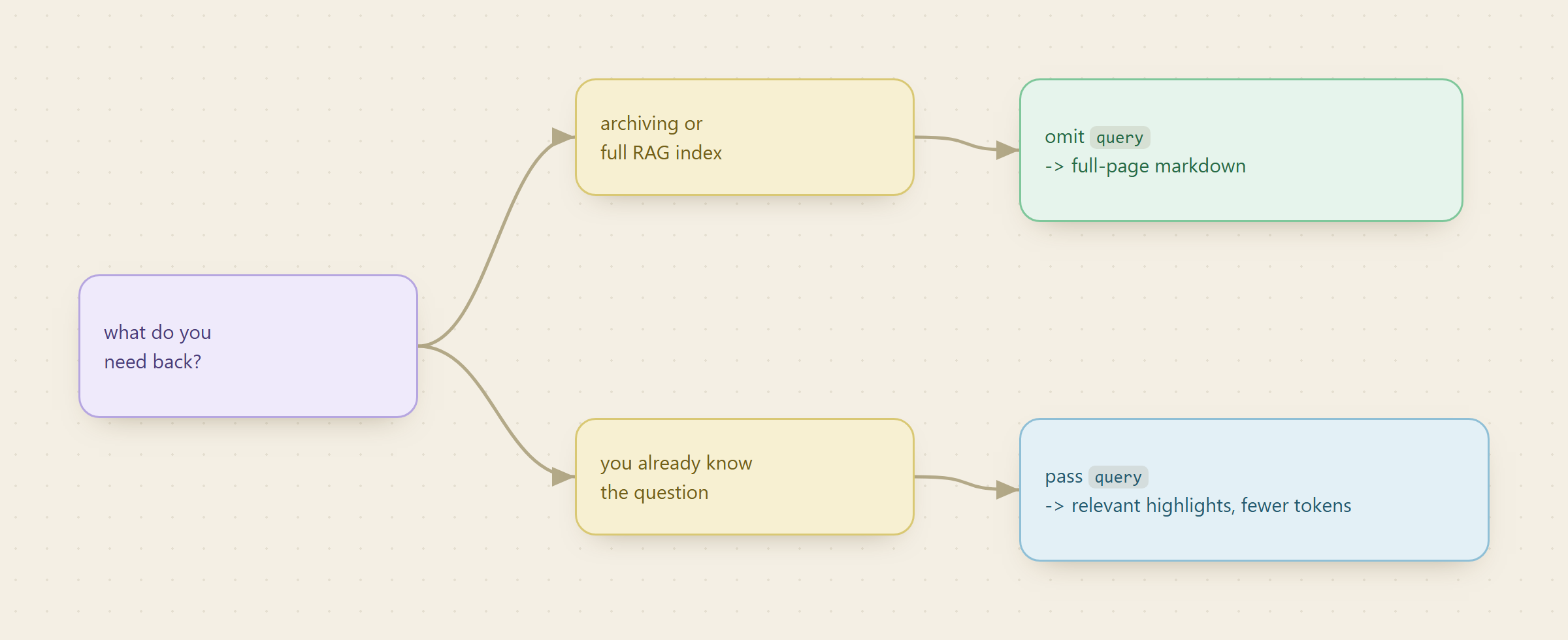
What it does. Returns only the passages relevant to an intent instead of the whole page.
The call.
monid run -p octen -e /extract -i '{
  "urls":["https://www.paulgraham.com/greatwork.html"],
  "query":"how to choose what to work on"
}' -w
What comes back. Query-relevant highlights per URL rather than full content.
Why it is a lever, not a convenience. Fewer tokens in means a smaller embedding bill, a tighter index, and less irrelevant context diluting a retrieval answer. Use it when you already know the question. Omit it when you are archiving, because a highlight is lossy and you cannot recover the rest later without paying again.
Step 3. Files, which a page scraper cannot open
What it does. Converts a file at a URL into the same markdown shape.
The endpoint. context.dev/parse handles PDFs, Office documents, images, code and data files, more than sixty formats, with optional OCR for scans.
The call.
monid inspect -p context.dev -e /parse
monid run -p context.dev -e /parse --query '{"url":"https://example.com/report.pdf"}'
What it costs. A flat per-call charge, with OCR billed as its own tier when you turn it on. That tier split is the thing to notice: a scanned PDF costs meaningfully more than a text-layer PDF, so detect which you have before running a thousand of them.
Why it matters for a mixed corpus. A web extractor given a PDF URL returns the viewer chrome, not the document. Routing by file extension before the call is three lines of code and it is the difference between a clean corpus and a poisoned one.
Step 4. Normalise once, then chunk
What it does. Makes documents from different sources comparable.
Store the markdown, the source URL, the extraction timestamp and the source type together. The timestamp is what lets you re-extract selectively later instead of rebuilding the index, and the source type is what lets you weight a reference page differently from a forum thread at retrieval time. The same discipline applied to a different source is why batching YouTube transcripts into a RAG store keeps the timestamp per segment: without it you can retrieve the claim but not cite it.
Which endpoint should I use for which job?
Every row verified with monid inspect on 2026-08-17.
| Job | Endpoint | Input | Billing shape |
|---|---|---|---|
| Up to twenty known URLs to markdown | octen/extract | urls[], optional query | Per successful URL, failures free |
| One known URL, cheapest path | context.dev/web/scrape/markdown | single url | Per call |
| A whole site, no URL list | context.dev/web/crawl | start URL | Per call, one document per page |
| Enumerate before extracting | context.dev/web/scrape/sitemap | site URL | Per call |
| Find the pages first | context.dev/web/search | query | Per result |
| A file, not a page | context.dev/parse | file URL | Per call, OCR is its own tier |
The axis to scan down is the first column. Two of these are per call and two are per result, and the difference is what changes how you architect: a per-result endpoint punishes a wide fan-out, a per-call one punishes a chatty loop. Choosing by job first and vendor second is most of the decision, which is the same conclusion as buying versus building a structured search feed.
When should you not use a hosted extractor?
Three cases, stated plainly enough that they cost us something.
Very high volume on a narrow, stable source set. If you extract the same few thousand pages daily and the markup barely moves, a maintained parser plus a small local model is cheaper at scale, and the r/LocalLLaMA thread above is the current evidence for that path being viable rather than theoretical. The crossover is not a slogan, it is arithmetic: price your volume against a per-URL charge and see.
Data you are not allowed to send out. A hosted extractor means the URL, and for parse the file, transits a third party. If that is a compliance problem, it is a hard stop regardless of cost.
You need the page, not the text. Layout, visual position, a rendered screenshot. Markdown deliberately discards all of it, and a browser session is the right tool instead.
And the caution about our own layer: what a listing claims about billing has not always matched what it charges, so inspect tells you what an endpoint claims and a small real run tells you what it charges. Run twenty URLs before you run twenty thousand.
Conclusion
Extraction stopped being the hard part. What decides whether an ingestion pipeline is good is boring: route by source type before the call, cache with a deliberate age rather than the default, keep the timestamp so you can re-extract selectively, and pass a query only when you already know the question.
The best extractor is the one whose failure mode you can see. A record marked failed and not billed is a better outcome than a record that quietly contains a cookie banner.
FAQ
Is there a free API to extract page content for RAG applications?
Discovery and schema reading are free, extraction is paid, and failed URLs are not billed. Caching with max_age_seconds is the closest thing to a free tier, because an unchanged page does not need re-extracting at all.
How many URLs can I send in one call?
Twenty, and that is a hard cap in the schema rather than a guideline. Results come back in input order, so you can zip them against your list without matching on URL. Verified against monid inspect on 2026-08-17.
How do I handle PDFs and Office files in the same corpus?
Route them to context.dev/parse instead of the page extractor, and turn OCR on only for scans, since it bills as a separate tier. A page extractor handed a PDF URL returns the viewer, not the document.
How do I stop paying to re-extract pages that have not changed?
Set max_age_seconds high for stable pages so the cache answers, and low only for pages that genuinely change. The default is one day.
Where does search fit in?
When you do not have the URLs yet. A search endpoint returns ranked result URLs to feed into the extractor, and the same pattern drives SERP tracking.
Last updated August 2026.